- Compare Editions
- Product Information
- Resources
- Licensing / Pricing
- Support
- Contact

Back to Setup Guide for Ransomware Protection
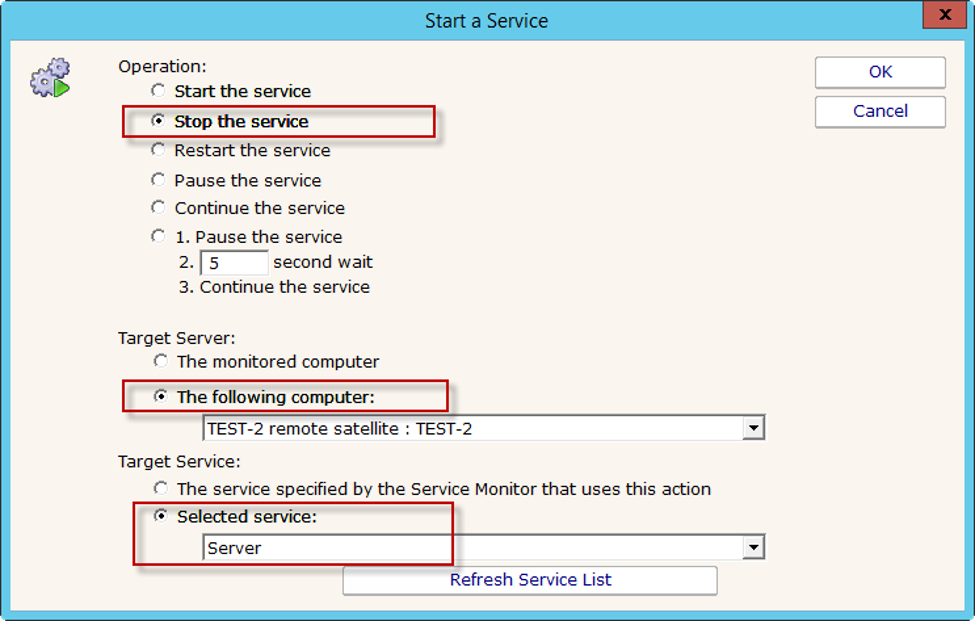
An additional approach to responding to a ransomware attack is to stop critical services on the server. One such service would be the Server service (also called the Lanman Server service).
The Server service: "Supports file, print, and named-pipe sharing over the network for this computer. If this service is stopped, these functions will be unavailable. If this service is disabled, any services that explicitly depend on it will fail to start."
By stopping this service, ALL file access from the network to the server would be blocked. This can be done by adding the Start, Stop or Restart Service action as shown below:
“Scary good service”
George H., Weyerhauser, USA