- Solutions
-
- File Server: Ransomware Protection
- File Server: File Copy
- File Server: Audit File Access
- File Server: Storage growth reporting
- Licensing/Pricing
- Contact

This help page is for version 10.0. The latest available help is for version 10.2.
The File Synchronzier Monitor is an automatic server to server file copy processor. It works between the Central Server and Satellite computers, similar to the Copy Files operation.
The File Synchronizer Monitor is a Global Monitor, which means it can be added in Advanced Services (on the navigation toolbar) > Global Monitors.
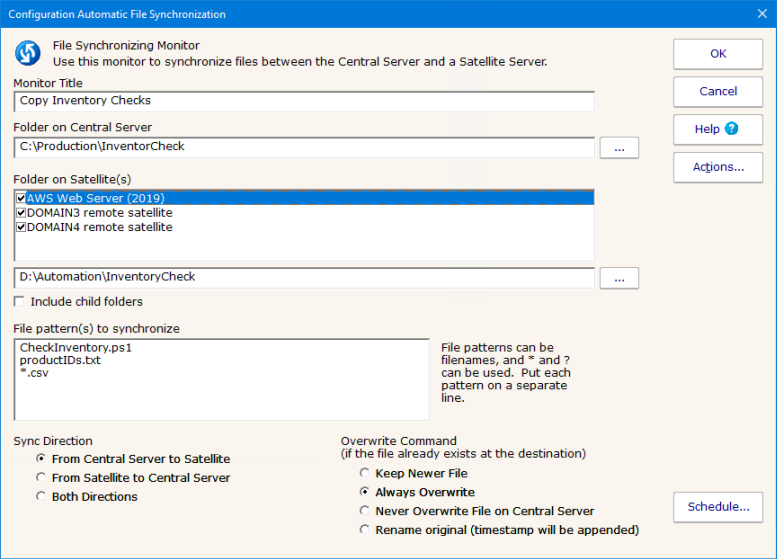
To create the monitor, you specify a source folder on the Central Server and a target server on the Satellite. Multiple Satellites can be chosen, and the same Satellite path will be used for all of them.
A file specification (such as *, or *.dat, etc) can be used, in addition a filename (such as IMPORT_DATA.db) can also be specified. For multiple specifications, put one on each line.
The direction of file copy is configurable (to or from the Central Server) and you can configure what happens when the file being copied already exists in the destination folder.
A security setting (AllowAutoSatelliteFileSync) can be used to enable or disable this feature on the Central Server and on a per-Satellite basis (the value can be set on the Central Server and on Satellites).
Like all monitors, there is a Schedule button in the lower right corner to control how often this file copy operation takes place. In addition, if a copy operation fails, actions will be fired. One exception to this is if the Satellite is not connected - in that case the copy would be expected to fail so actions are not fired. To get alerts if Satellites are own, use the Satellite Down Notifications or System Audit Monitor.