Login

Javascript must be enabled to download our products and perform other essential functions on the website.

ionicons-v5-m
ionicons-v5-j
Buy Now Download Free Trial
ionicons-v5-m
ionicons-v5-f

This help page is for version 10.0. The latest available help is for version 9.6.

System Audit Report

The System Audit Report is a pulled from a database of activities that have happened in the monitoring system.

Note that these events can be alerted on using the System Audit Monitor.

System Activity Types

  • Action Created, Deleted, Changed, Locked or Unlocked
  • Auto Configuration Setting Changed
  • Auto-Recovery Step Run
  • Bulk Config Operation
  • Central Server Boot or Abnormal Stop
  • Central Service Start or Stop, Running, Self-Restart
  • Computer Created, Deleted, Changed, Moved, Enabled or Disabled for Monitoring, Maintenance Started or Ended
  • Executed Custom SQL
  • Group (servers) Created or Deleted
  • Monitor Created, Deleted, Changed, Disabled or Enabled, Locked or Unlocked, Maintenance Start or End
  • Monitor Template Created, Deleted, Changed, Enabled or Disabled for Propagation
  • Satellite Server Boot or Abnormal Stop
  • Satellite Service Connected, Running, Down, Service Start or Stop
  • Sent Email
  • SNAP Tunnel Created or Destroyed/Closed
  • System Alert
  • User Account (for product) Locked For Failed Logins
  • User Login Succeeded or Failed
  • User Logged Out

This data is collected and stored automatically - nothing needs to be configured.
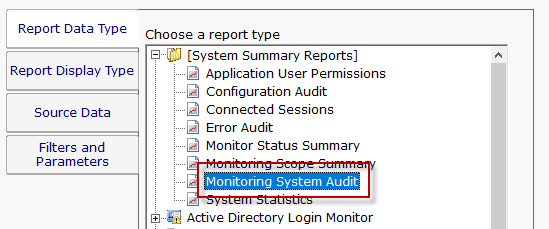
Monitoring Audit Report

The report is located at [System Summary Reports] > Monitoring System Audit.
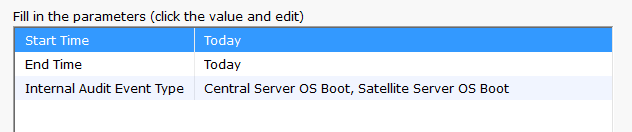
Audit Report Date Entry

Configuring the report is as simple as choosing a date range, and the type of events you would like to see.
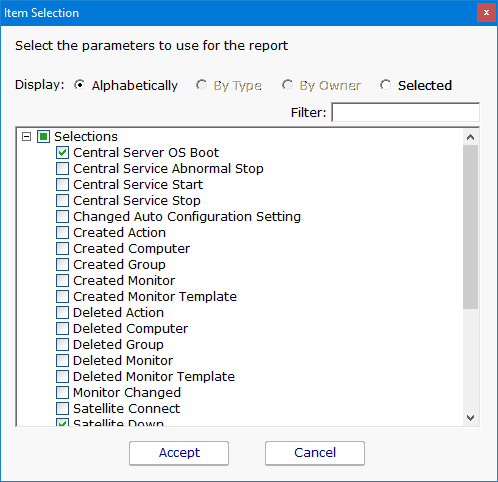
Audit Report Event Types

PA Server Monitor

Help Map
