- Solutions
-
- File Server: Ransomware Protection
- File Server: File Copy
- File Server: Audit File Access
- File Server: Storage growth reporting
- Licensing/Pricing
- Contact

This help page is for version 9.6. The latest available help is for version 10.2.
Currently Microsoft's SQL Server is the only database supported by this monitor.
A Database Monitor can be created directly, or it can be created from the Database Server Monitor.
The Database Monitor needs a connection string to connect to the target database.
For help coming up with the proper connection string, please see:
https://www.connectionstrings.com/sql-server/
In this step, you do NOT need to specify a Database parameter yet. So one of the two connection strings below will probably work:
Using Trusted_Connection
Using Username/Password
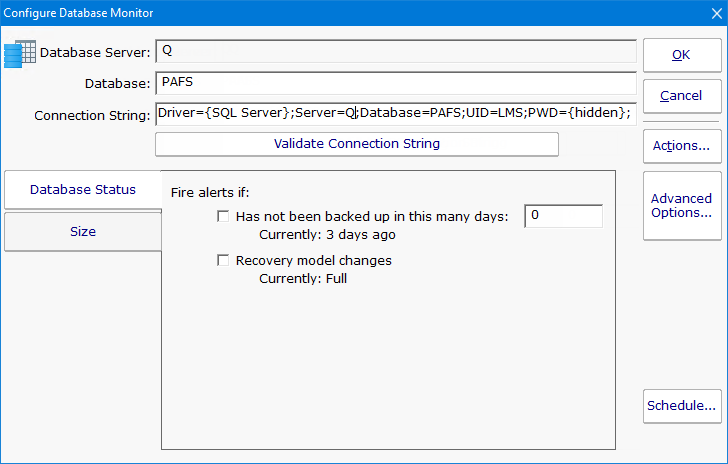
When this monitor is created via the Database Server Monitor, the connection string is automatically generated for you based on the connection string used in the Database Server Monitor. You can edit it as needed.
The Database Monitor has two tabs that control what it will watch. It can watch and alert on the status which involves the database's backup and recovery model. To watch that the database itself is up, use the Database Server Monitor above.
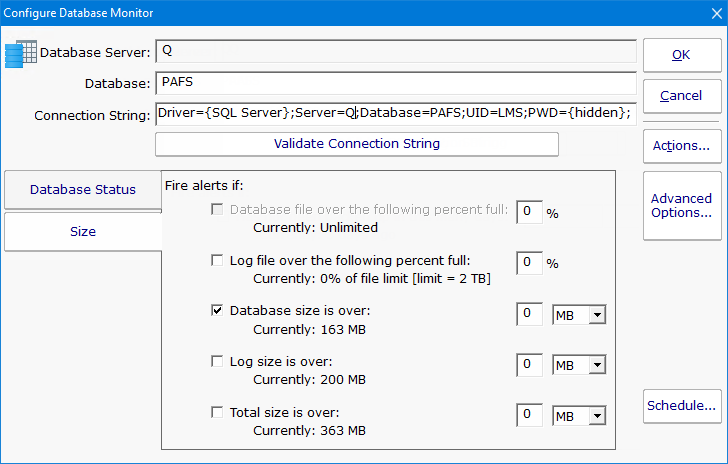
The other tab lets you monitor the size of the database and its transaction log.
Like all monitors, this monitor has standard buttons on the right for Adding Actions, setting Advanced Options and setting the Monitor Schedule.