- Solutions
-
- File Server: Ransomware Protection
- File Server: File Copy
- File Server: Audit File Access
- File Server: Storage growth reporting
- Licensing/Pricing
- Contact

This help page is for version 10.0. The latest available help is for version 10.2.
Maintenance Mode is very useful when you'll be working on a computer that is being monitored. Naturally you don't want to receive alerts or have the monitoring service try to correct things that you are working on. Instead of stopping the monitoring service (and potentially forgetting to start it again), you can indicated the monitored computer is being worked on with Maintenance Mode.
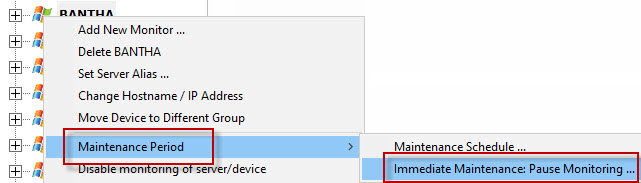
You manually put a server into maintenance mode immediately by right clicking on the computer and choosing Maintenance Period -> Immediate Maintenance: Pause Monitoring.
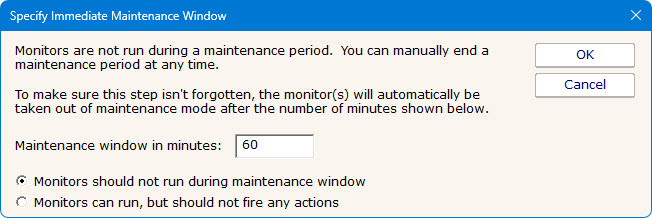
When you enter Maintenance Mode, you specify how long you expect to be working on the server. Active monitoring of the server begins again automatically at the end of the maintenance period.
You select how the maintenance mode works. Either no monitors will run on the target server, or monitors will run but they will not fire actions. This second option is useful to keep recording data to the database without getting alerts that are distracting and even expected during a maintenance window.
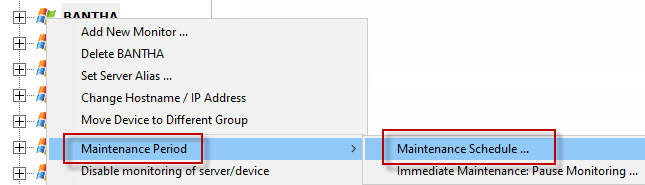
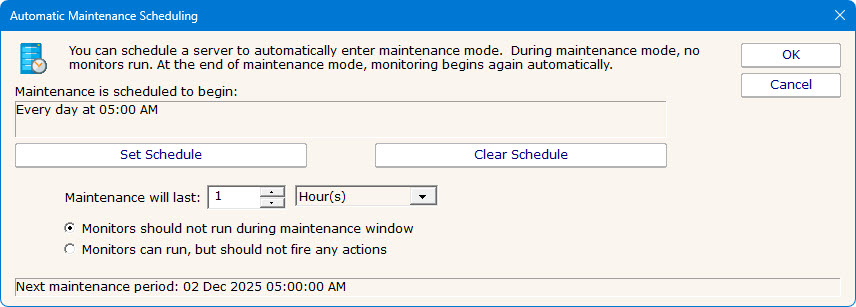
In addition to the manual maintenance mode mentioned above, scheduled maintenance is also available. With this feature you can have the monitoring service automatically place a server into maintenance mode based on your schedule. This is often useful when some normal process (a nightly backup process for example) might exceed some of the monitors' normal thresholds.
Besides putting servers into maintenance mode, you can also put individual monitors into maintenance mode in the same way.
You can right-click on a group and start an Immediate maintenance mode on all servers within the group. Specify the time the servers should remain in maintenance mode before they are automatically returned to a normal state.
Finally, there are Bulk Config operations to put a list of servers or monitors into maintenance mode in one simple operation.