- Solutions
-
- File Server: Ransomware Protection
- File Server: File Copy
- File Server: Audit File Access
- File Server: Storage growth reporting
- Licensing/Pricing
- Contact

This help page is for version 10.0. The latest available help is for version 10.2.
The PA Server Monitor service contains an embedded web server for serving HTML reports to the Console and to browsers, as well as communicating with the Console and Satellite Monitoring Services. This embedded web server does NOT use or require IIS, and it can run on the same server as IIS or other web servers since it can use any port specified.
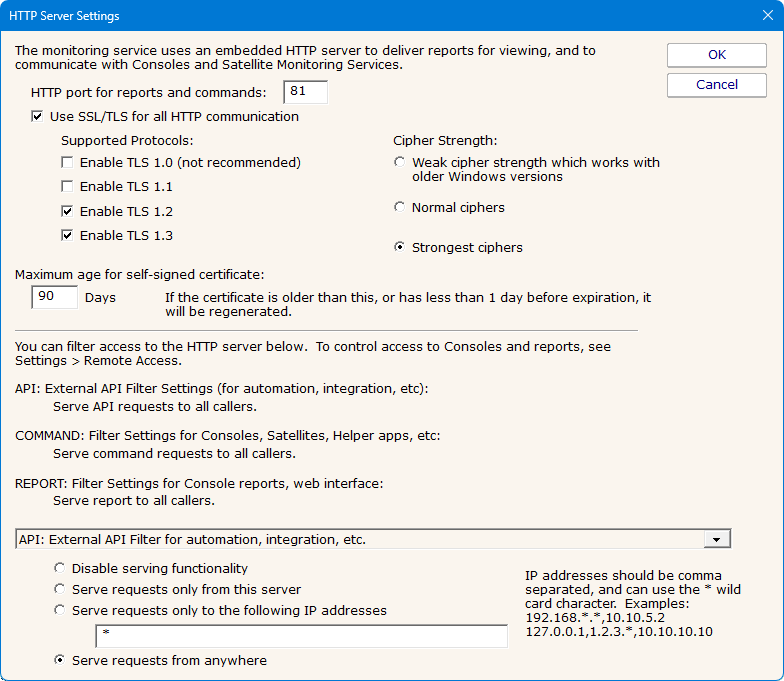
The options available for controlling the built in web server are as follows.
This setting lets you set the port which the embedded web server uses to listen for requests. Port 80 is generally used by IIS and Apache as the standard HTTP port for a web server. PA Server Monitor chooses a different port so it doesn't conflict. If you have another application that is already using this different port, you can easily change the port to another number.
PA Server Monitor supports using HTTPS for all communication to the service, which includes viewing reports, and Console-to-service communication. Self-signed digital certificates are used. This means most browsers will display a warning even though the HTTPS network traffic is encrypted. To fix the warning in the browser, follow the instructions on SSL Certificate Hints.
You can also get a signed SSL certificate which will remove the warnings.
NOTE: For security reasons, usage of remote Satellites and/or Remote Consoles requires SSL to be enabled.
You can control the strength of the encryption settings by setting the TLS version and also the cipher strength. The strongest ciphers are recommended, but older operating systems might not be able to connect with those settings.
If you are using the default self-signed certificate, it will automatically get regenerated when it is the specified number of days old. This happens on the fly and does not need a restart of the monitoring service.
You can determine how PA Server Monitor serves reports. There are four options. You can disable all report serving. You can enable serving of reports but only to the same machine on which PA Server Monitor is installed. You can serve reports only to a set of other users, identified by the IP addresses of their computers. Or, you can serve reports to any other computer that requests reports. The default setting is "Serve reports to everyone".
You can optionally require a user login to access reports. See Report Settings.
Commands are sent from a variety of sources, including the Console, worker processes, optional remote Satellites and some dynamically updating reports. This setting determines where command requests can come from. Generally it is best to leave it at "Service requests from everyone" since all sensitive data is protected by username/password and/or SSL (if enabled) when in transit.