- Solutions
-
- File Server: Ransomware Protection
- File Server: File Copy
- File Server: Audit File Access
- File Server: Storage growth reporting
- Licensing/Pricing
- Contact

This help page is for version 10.0. The latest available help is for version 10.2.
NOTE: This is an experimental report. Sometimes there is a lot of background file I/O that gets pulled into the report that makes it harder to look at.
The File Journey Chart attempts to show in a graphical way where file data has gone. It requires Endpoints to be useful.
To run the File Journey Chart report, you specify a part of a filename (similar to the File Changes report), and then it finds matching files and shows what happened to the files.
Look at the example report below. This report was started with the word 'secret', i.e. looking for all files recently read on the server that contain the text 'secret' in the filename.
The red explanatory text would not be in the report, but otherwise this is a typical report.
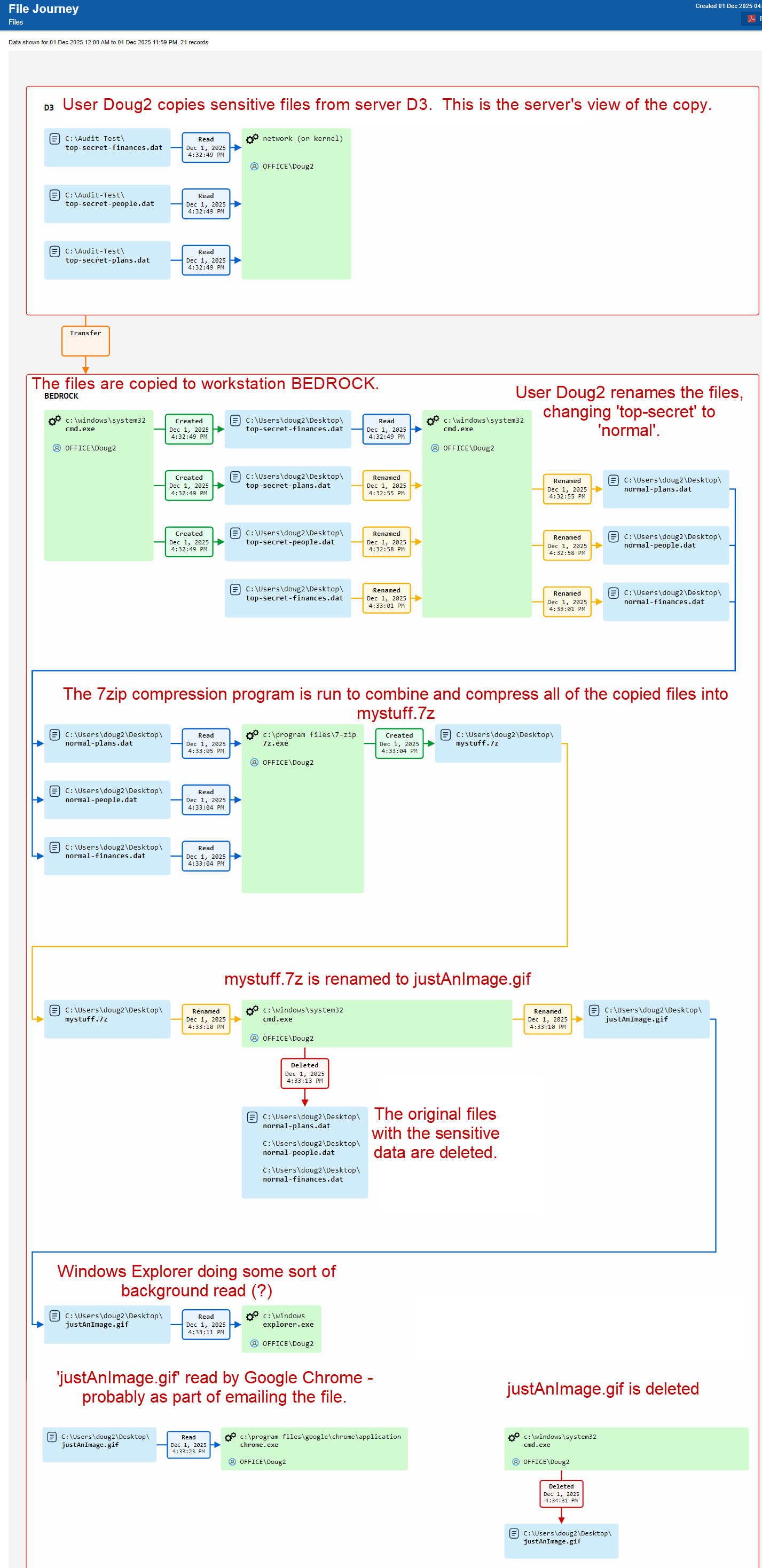
Notice how this report has shown how the user has copied 'top-secret' data and attempted to obfuscate what was happening in order to hide his tracks.