- Solutions
-
- File Server: Ransomware Protection
- File Server: File Copy
- File Server: Audit File Access
- File Server: Storage growth reporting
- Licensing/Pricing
- Contact

Starting with version 3.7, Power Admin products (PA Server Monitor, PA Storage Monitor and PA File Sight) support using SSL-enabled HTTP (HTTPS) for serving reports, and for console to service communication. Self-signed certificates are used so you have immediate SSL protection without the need to purchase a commercial SSL certificate.
You can usually see the cause of the error by opening the URL in question in a browser and looking at what the browser reports about the certificate error. In the image below, we clicked the certificate error and see the root cause displayed.
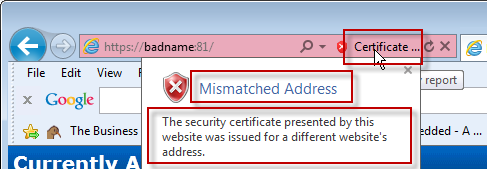
SSL errors are usually caused by one of three things:
Most SSL certificates come from a well-known certifying authority like Verisign, Thawte, GeoTrust and others. These companies charge for their certificates, which enables them to do some level of check on the company requesting the certificate. Because of this, browsers recognize certificates signed by these Certificate Authorities.
With self-signed certs, a Certifying Authority was not involved. That means the product has to sign it's own SSL certificates, and therefore be its own Certifying Authority. Since the browser doesn't know about this new Certifying Authority, it shows warnings indicating it doesn't know whether to trust the SSL certificate or not.
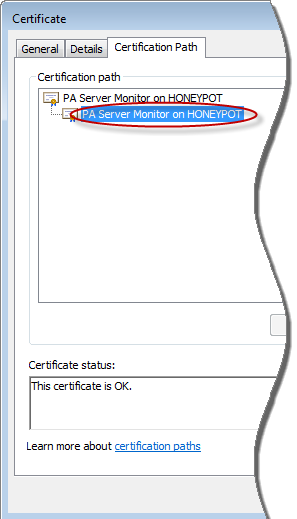
To make the browser stop displaying the warnings, you have to install the new Certifying Authority certificate into the browser as a Root CA or Trusted CA. Be careful -- only install a new Certifying Authority when you know who it is because you are telling the browser to trust SSL certificates from that authority. In this case, the Power Admin product created the new Certifying Authority on your computer. No other computer has that Certifying Authority.
For instructions on installing a new Certifying Authority in popular browsers, choose your browser below:
Instruction for installing in Internet Explorer
Instruction for installing in FireFox
Instruction for installing in Google Chrome
When the SSL certificate was made, it was created using the computer's name, localhost and 127.0.0.1. In the examples above, that means we could go to https://dnvista or https://localhost or https://127.0.0.1 and the host name in the URL would match the host name listed in the SSL certificate. If you access the page using the host name in the certificate, mismatched host address errors will go away. If you can't access it with the host name in the certificate (perhaps because an external host name is being used) adding a hosts file entry will make it so you can. But first, you need to see which host names are in the certificate.
Click the certificate, and then view the Details tab and the Subject Alternative Name field as shown below:
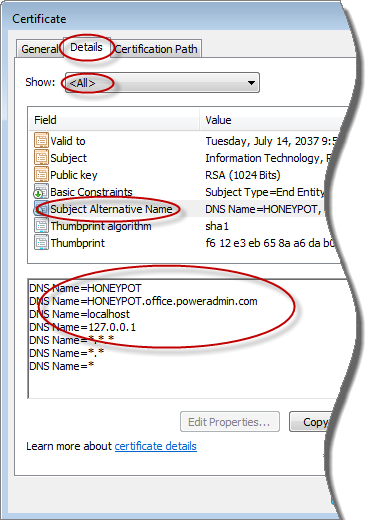
Adding a hosts file entry for one of those names that points at the monitoring service will quiet the browser's certificate complaints.
If your host name changes, or you want to regenerate the default SSL certificate for any reason, you can do that by using RegEdit and going to:
HKEY_LOCAL_MACHINE\SOFTWARE\Wow6432Node\Software\PowerAdminServerMonitor
- or -
HKEY_LOCAL_MACHINE\SOFTWARE\Software\PowerAdminServerMonitor
Delete the value named SSL_GenSAN. Then restart the service -- when it starts up, a new SSL certificate with the current host name will be created.
If you would like to add an additional host name to the Subject Alternative Name field show in the image above, you can do that by setting the SSLSANName field to the new host name. You can add multiple host names by separating them with a comma. Delete the SSL_GenSAN value and restart the service and the certificate will be rebuilt with the new host names.
If you have an SSL error in the Console that you can't click past, open RegEdit and go to:
HKEY_LOCAL_MACHINE\SOFTWARE\Wow6432Node\Microsoft\Internet Explorer\MAIN\FeatureControl\FEATURE_SSLUX
- or -
HKEY_LOCAL_MACHINE\SOFTWARE\Microsoft\Internet Explorer\MAIN\FeatureControl\FEATURE_SSLUX
There should be an entry for Console. Change it to:
Console = 1
Restart the Console and you should be able to click past the SSL error. You can use the two techniques discussed above this topic to fix the source of the SSL error.
“That worked. You guys have the best customer service.”
Mary B., CIMTechniques, Inc., USA