- Solutions
-
- File Server: Ransomware Protection
- File Server: File Copy
- File Server: Audit File Access
- File Server: Storage growth reporting
- Licensing/Pricing
- Contact

The Log File Monitor watches text files and notifies you when specific text is seen. You can use standard Windows wildcard characters ? and * to specify more than one file to monitor.
The Log File Monitor employs an efficient mechanism to only read changed parts of the file(s). That means it starts reading only text that is added after the first run of the monitor. The search text can be specified as a simple phrase, or you can use the power of regular expressions for more complex text searches.
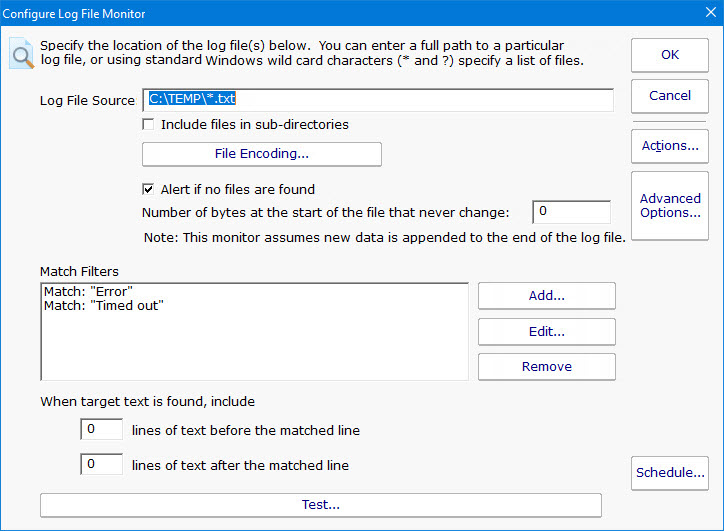
Multiple filters can be specified as in the example above. If any filter matches, the monitor will alert on the matched line of text.
Filters can be specified in two ways: text matching or Regular Expression.

The first option is a simple text search. You enter exactly the text that you want found, and specify whether the case should match or not. This is good for searching for specific phrases or specific words or parts of words. An example would be: database connection error
The second option lets you specify the search text with Regular Expressions (a great refresher is available at RegExLib.com). For example, if you want to search for the word 'error' OR 'failure' you would enter: error | failure
You can test your filters with the Test button. This will send your filters and file specification to the monitoring service to make a quick check. One Caveat: When testing, the check will run from the beginning of the file. When the monitor is running normally though, it's only going to check what has been recently added to the file (so it doesn't keep alerting on the same text over and over).
Like all monitors, this monitor has standard buttons on the right for Adding Actions, setting Advanced Options and setting the Monitor Schedule.