- Solutions
-
- File Server: Ransomware Protection
- File Server: File Copy
- File Server: Audit File Access
- File Server: Storage growth reporting
- Licensing/Pricing
- Contact

The Citrix monitor is a simple "health check" of a Citrix Virtual Apps and Desktops server (formerly XenApp and XenDesktop). The monitor will periodically connect to and log in to the Citrix server, and will time that event. If the login fails to occur, or if it takes too long, the monitor will enter the alert state and fire actions.
The Citrix monitor expects to find a Citrix server at the address of the "computer" that the monitor is attached to. Normally, a Citrix server will require its own Computer entry in the Navigation Pane's list of computers and devices and that entry will indicate the network name or IP address of the Citrix server.
NOTE: The Citrix Monitor requires the Citrix ICA Client to be installed on the same machine as PA Server Monitor
The dialog below is used to configure the Citrix Monitor.
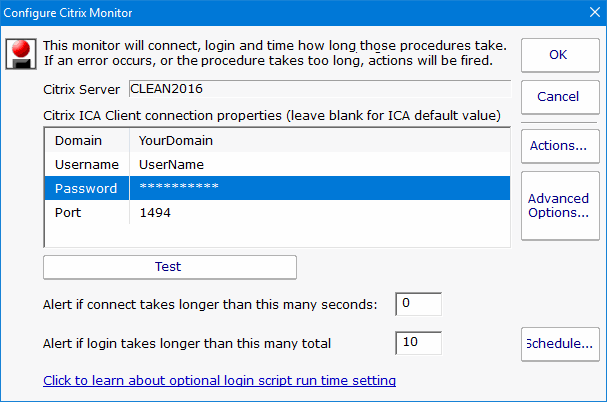
You need to enter the domain name, user name, and password into the dialog. If the Citrix server is configured for a non standard port, you need to enter that port value too.
The Schedule function specifies the interval at which the test of the Citrix monitor (the connection and test login sequence) will be applied.
Like all monitors, this monitor has standard buttons on the right for Adding Actions, setting Advanced Options and setting the Monitor Schedule.

The Citrix monitor supports creating reports on the connect and login times that were recorded. You can create bar and line charts, as well as .CSV and tabular HTML reports.
Logging into a Citrix server involves various stages. The first two stages are connect then login. Successfully passing through these puts a client into a logged-in relationship with the server (the client's credentials have been accepted and a session is established). At this point, however, the session may not be fully functional from a user standpoint. For example, there may be Windows Startup programs expected to run (or other login actions that are launched). This means that the time to login (the time to establish valid credentials) may happen rather quickly while the time needed to get a fully running Windows may take longer. In this way, login can be subdivided as follows:
1) Initial Citrix Login (Validating Credentials)
and
2) Running Windows Startup Programs
The alert value supplied for "Alert if login takes longer than this many seconds" is associated with the first of those. Normally, this is not noteworthy, but there is a known "black hole" condition in Citrix Servers where the Initial Citrix Login works, but nothing happens after that. Users who experience this often describe it as a hung server. When a server enters such a state, it is difficult to detect because the Initial Citrix Login works.
If such a hung condition is suspected, then it can be detected by using advanced features within PA Server Monitor. Here is how:
1. Specify how long to it takes for the Windows Startup Programs to run.
In the registry on the machine running PA Server Monitor, specify the number of seconds that the Citrix monitor should stay logged in to allow the all Windows Startup Programs to run. That registry setting is:
HKEY_LOCAL_MACHINE\SOFTWARE\PowerAdminServerMonitor [DWORD]Citrix_LoginScriptRunSeconds
You should set this value to match how long it takes for your startup programs to launch in your Citrix environment. For example, if after logging into Citrix it takes an additional 15 seconds for Windows to run the programs in the Startup folder, then you would set this value to 15.
2. Create a Citrix script.
Using the same Citrix user specified in PA Server Monitor, log onto the Citrix server and add a batch file to your Windows Startup folder. This batch file (or startup script) is a simple text file created with Notepad. You should save it as a .CMD file (for example, C:\TEMP\PALogin.CMD) and then add C:\TEMP\PALogin.CMD to your Windows Startup. The startup script (the .CMD file) should contain the following line:
echo Power Admin > c:\temp\pa_watch_this_file.txt

What this does is it overwrites the text file called "pa_watch_this_file.txt" every time the user logs in.
The key here is this: if for some reason the Windows Startup Programs do not run, then the text file pa_watch_this_file.txt will not be refreshed (it will grow stale). We will then monitor that file (see the next step) and if it is ever older than expected, then we know that the Running of Windows Startup Programs is not taking place as expected. That is, we will know that we can log onto the Citrix server, but the server is acting as if it is in a hung state.
3. Monitor for a stale file.
If you followed the previous step, then you have configured a Citrix user such that a Windows Startup script will run every time that user logs in; in the example provided, it will create a file called c:\temp\pa_watch_this_file.txt. You now need to monitor the age of that file using PA Server Monitor. To do that, add a File Age Monitor as follows:

If the Citrix Monitor is running every four minutes (as an example), then a full login should happen every four minutes and the file we are monitoring should never be older than
five minutes. We will monitor that condition.
NOTE: If PA Server Monitor is not running on the Citrix server itself, then a UNC designator can be supplied for the file (pa_watch_this_file.txt).
