- Compare Editions
- Product Information
- Pricing/Licensing
- Resources
- Support
- Contact

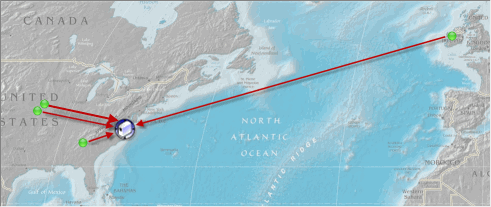
Virginia, USA - The Live Demo is hosted on an Amazon EC2 medium instance. It monitors itself and a few other servers in the Virginia data center.
The Live Demo's Central Service has four Satellite Monitoring Services communicating with it:
This small installation is monitoring approximately 120+ servers/devices.
You can view the demo three different ways:
Visit the following link with your web browser: https://demo.poweradmin.com:81/
NOTE: Since the default is to use a self-signed certificate, that is what the demo is using. You can add your own certificate to your installation.
Both iPhone and Android apps can quickly connect.
Host: demo.poweradmin.com
Port: 81
Download the latest release and install the Console part of the application.
Host: demo.poweradmin.com
Port: 81
Two sets of credentials are available to demonstrate Access Control. Either can be used with the different connection options above.
View everything (read-only for the demo)
User: demo
Password: demo
A fictional company's view of their own servers and devices. Managed Service Providers would give this kind of access to their customers.
User: abc
Password: demo
“We manage over a hundred networks around Dallas/Fort Worth, Texas. Your product has been awesome!”
Oly G., On-Site Computer Solutions, USA