- Solutions
-
- File Server: Ransomware Protection
- File Server: File Copy
- File Server: Audit File Access
- File Server: Storage growth reporting
- Licensing/Pricing
- Contact

The most common problem when trying to monitor remote server resources (disks, PerfMon counters, running services, Event Log, etc.) is getting the remote server to allow access to the resources. Windows security won't simply fulfill any requested access issued by any random machine on the network (imagine the chaos!). A token representing the user making the request is sent along with the request. The remote server checks the token against an access control list which protects the target resource and determines whether to allow access or not.
Skip forward to your particular scenario:
When using a non-domain account, a local administrator account will not have administrator rights when connecting remotely because of UAC. A registry setting can change this effect.
Read more at: https://learn.microsoft.com/en-us/troubleshoot/windows-server/windows-security/user-account-control-and-remote-restriction.
So which user is making the request?
Go to the Services control panel applet (under Administrative Tools), and open the properties for any service. You will see a Log On tab. This tab controls which user account is used to launch the service. All services run as some user. A special user account named Local System is often used which has full access to the local machine, but no access outside the machine. In addition, you can right-click on a computer in the Console and select "Set Login Credentials" to set computer-specific credentials to use when monitoring that computer.
If no computer-specific credentials are entered, then all requests are made as the user which is listed on the Log On tab (also shown in Settings). In the examples below, we assume that there are no computer-specific credentials.
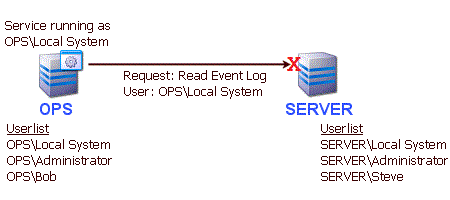
Consider the scenario where machine "OPS" is running a service (like the Power
Admin monitoring service) and wants to look at the Event Log on machine "SERVER". If the service
is running as Local System, the Event Log request would contain a token
referring to user "OPS\Local System". The problem is, machine SERVER doesn't know
anything about "OPS\Local System". For all it knows, that account might be a
simple guest account. Access will be denied.
What solutions exist?
There are two basic ways to get around this
problem, and they both involve getting the request on OPS to run as a user which
SERVER will recognize.
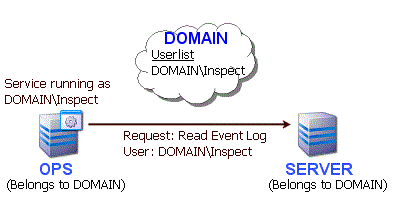
This solution requires using domain accounts. Imagine that the machines OPS and SERVER are both in a domain named DOMAIN. The domain could then have a user created named "Inspect" for example. The service on OPS should then have it's Log On user set to DOMAIN\Inspect. On SERVER, you would grant access to any resources that should be monitored to user DOMAIN\Inspect (or as a shortcut, make DOMAIN\Inspect part of the local Administrators group). When Server Monitor tries to monitor the Event Log on SERVER for example, a token representing DOMAIN\Inspect will be passed with the request. SERVER will recognize the token and allow access according to the rights granted to DOMAIN\Inspect.
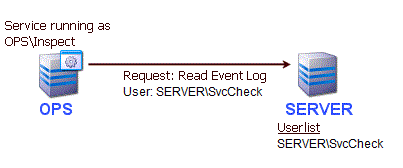
If the main monitoring service is NOT running as Local System (or in other words, as a domain account or a local account), then you can specify server-specific credentials to be used. This allows you to specify a specific account (a local account on the target server, or a domain account to use when accessing the server). In the example below, the SERVER is accessed using a local account named SvcCheck. SvcCheck's credentials were entered for SERVER by right-clicking on SERVER and choosing Type & Credentials > Set Windows Credentials.
This solution can be used if you want the monitoring service to use a local account, and you want that same account to automatically be used when accessing remote servers, without specifying a specific username and password for each remote server.
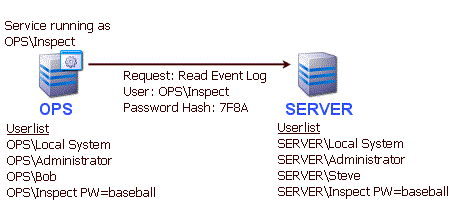
The solution is to use synchronized username and passwords on the two machines. You can create a user account named "Inspect" on OPS with password "baseball". Then go to SERVER and create a user account named "Inspect" with password "baseball". When user "Inspect" runs the service on OPS, and sends a request to SERVER, the token turns out to contain not just the username, but a hashed form of the password as well. When SERVER receives the request, it checks its local user database and finds a matching user, hashes the local password and finds that they match. It then allows the request as though it had originated from the local user "Inspect". Any access to resources granted to the local user "Inspect" on SERVER can be accessed remotely from the similar user "Inspect" on machine OPS. The downside to this solution is it requires all monitored machines to have synchronized usernames and passwords. This doesn't work for "Local System" because Local System is a special operating system account tied to the local computer (and you can't set Local System's password).
NOTE: Starting with Windows XP a security policy was introduced that causes incoming local credentials (from a remote host) to be assigned Guest user rights. That won't help. You'll need to set the policy back to Classic mode. Microsoft documents this here: [1]. This can be corrected by switching to Classic file sharing, or by going to Administrative Tools > Local Security Policy > Security Settings > Local Policies > Security Options. Look for "Network Access:Sharing and Security model for local accounts" and set it to "Classic".
IMPORTANT NOTE: The solutions above discuss changing which user the monitoring service runs as. You can also set the login credentials on each individual server from within the Console. Right click the server and you'll see the Set Login Credentials option. You can choose to communicate with the server as the user running the service, or pick a specific username/password for that server.
Is there any other way?
There is an additional alternative: Install
the monitoring product on the remote server. It can then run as Local System and look
just at the server itself. Power Admin monitoring products install quickly, and the Easy
Configuration feature makes it simple to copy a monitoring configuration
from one machine to another.
When monitoring machines that are in the same domain as the monitoring server, it's easiest to use a domain account to gain access to the remote servers. If one domain account will work for all servers, you can set the service to run as that account -- that is the easiest scenario.
If you can't run the service as a domain account (perhaps because multiple domains are involved), you might need to specify separate credentials for each server. You can do many at once via Bulk Config, or right-click on an individual server and choose Type & Credentials > Set Login Credentials.
Troubleshooting: If you get an error indicating the credentials don't grant access to the remote machine, that very often implies some sort of firewall (a network
firewall and/or a firewall running on the remote machine) is blocking access. In that case, try to remove as many variables as possible and see
if a connection can be made. We recommend using the Windows Event Log Viewer. Start it, and using it, try to connect to the remote machine and
view its Event Log. If you can not connect (perhaps with RPC errors) that very often indicates a firewall is blocking Windows RPC calls.
More info on Windows RPC ports
Also make sure the Remote Registry service is started on the target server.
When either the monitoring server or the target server are not in a domain, local accounts have to be used. In this case there are two options:
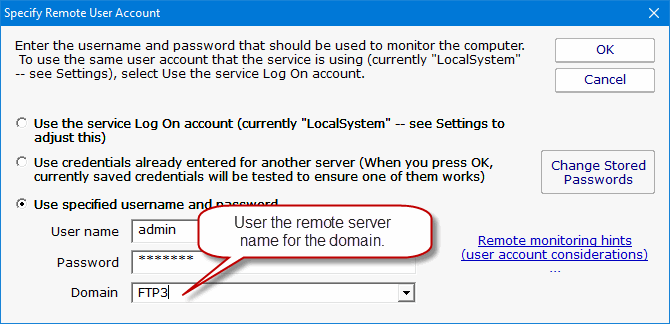
Troubleshooting: If the above doesn't work and you get an error indicating the credentials don't grant access to the remote machine,
that very often implies some sort of firewall (a network
firewall and/or a firewall running on the remote machine) is blocking access. In that case, try to remove as many variables as possible and see
if a connection can be made. We recommend using the Windows Event Log Viewer. Start it, and using it, try to connect to the remote machine and
view its Event Log. If you can not connect (perhaps with RPC errors) that very often indicates a firewall is blocking Windows RPC calls.
More info on Windows RPC ports
Also make sure the Remote Registry service is started on the target server.
If you can connect with the Event Log Viewer, but you are still told the credentials aren't working, you can force the monitoring product to create a connection to the server via the \\server\IPC$ share. To do this, go to:
PA Server Monitor
HKEY_LOCAL_MACHINE\Software\PowerAdminServerMonitor
PA Storage Monitor
HKEY_LOCAL_MACHINE\Software\PAStorageMonitor and set/create the DWORD value ImpForNetConnect = 1
The information above for Connecting to Servers in a Domain and Connecting to Servers NOT in a Domain still applies to Windows 2008 Servers and Vista. However, Windows 2008 and Vista comes with a powerful and strict firewall that is turned on by default. This firewall will almost certainly block remote monitoring requests.
To change the firewall configuration, go to Administrative Tools -> Windows Firewall with Advanced Security. Microsoft has a good Getting Started Guide to help you become familiar with the interface.
There are firewall rules to control fine-grained access to the server. If you want to monitor the server's Event Log, you'll need to enable those rules. For monitoring services, you'll need to enable the service-related rules. If you want the rich server status report (which is built by polling the server via WMI), you'll need to enable the WMI rules.
From reports we're receiving from the field, it appears UAC needs to be disabled for remote WMI queries to work. With UAC running, an administrator account actually has two security tokens, a normal user token, and an administrator token (which is only activated when you pass the UAC prompt). Unfortunately, remote requests that come in over the network get the normal user token for the administrator, and since there is no way to handle a UAC prompt remotely, the token can't be elevated to the true-administrator security token. So if you find that you can perform certain activities (like clear an event log for example) when logged on directly to a Vista/Windows 2008 machine, but can't do it remotely, you can thank UAC :)
“I wanted to say thank you for the brilliant product, PA Server Monitor! It has given me a much greater sense of security and confidence in my network administration duties, and is an absolute must for every admins toolkit.”
Joe J., TechProse , USA