- Solutions
-
- File Server: Ransomware Protection
- File Server: File Copy
- File Server: Audit File Access
- File Server: Storage growth reporting
- Licensing/Pricing
- Contact

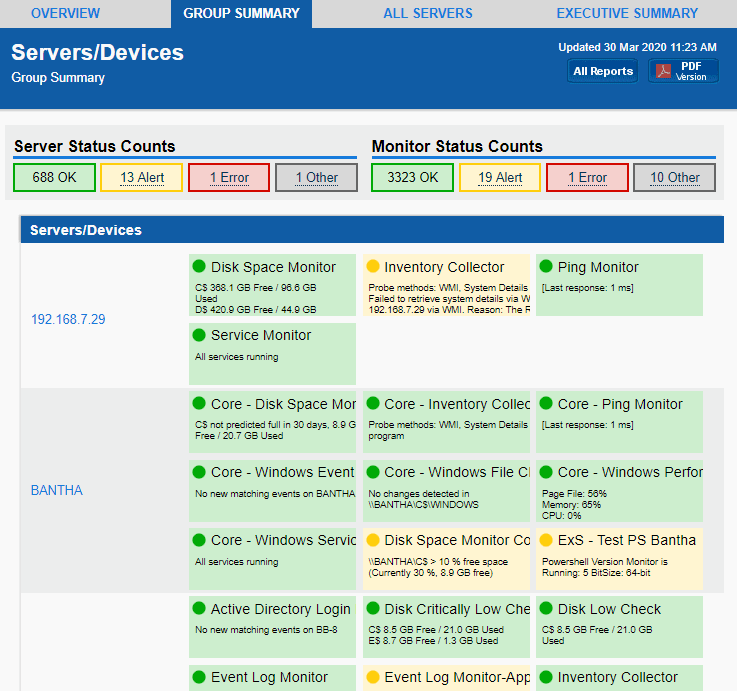
The Group Summary Report is a great way to get a detailed view of many servers at once. Like all group-based reports, there is a grey menu bar at the top that will take you to the other reports for the current group. Below and to the right is a button to go to an index of all reports, and a button to get a PDF of the report as it looks currently.
Next are two small tables indicating the number of servers and monitors that are OK (green), in Alert state (yellow), in error (red), or disabled/maintenance/etc (grey). A server is red if there is at least one monitor that is red, or yellow if there is at least one monitor that is yellow.
Moving downward you come to the group title bar for the current group. Within the group are the individual servers within the group, and optionally child groups will also be shown if there are any. Each server is represented as a line, with individual monitors on that server represented by boxes. The box color indicates the monitor's status. Green is OK, yellow is a warning, red is an error and grey means not monitoring (disabled, maintenance period, monitor dependencies not met). See below for changing the box size.
You can click on any server name to be taken to that server's server status report.
Group status reports can be configured to auto-rotate among reports. See Group Report Settings.
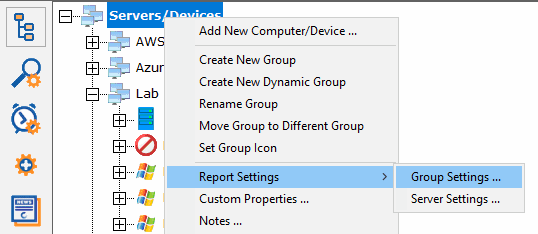
If you are using a Ultra, Pro or Lite license, you can also schedule the status reports to be emailed to you. Simply right-click on the group and choose Report & Delivery Settings.
To see an even higher level view of the servers within the group, try the All Servers Report or customize the Visual Status Map report.
Some people like the level of detail available with a larger monitor box. Others want to get status about more servers on the screen. You can configure the size of the monitor box by right-clicking the group and going to Report & Delivery Settings. Select the Group Summary Report and click Edit Report Settings. You will be able to choose whether to show the title and additional details as shown above, or just the title, and how wide the title should be.

To see the most server statuses on the screen at once, use the All Servers Report