- Solutions
-
- File Server: Ransomware Protection
- File Server: File Copy
- File Server: Audit File Access
- File Server: Storage growth reporting
- Licensing/Pricing
- Contact

The Disk Space monitor is simple to setup. You just add the drives that you want to monitor and the alert threshold (as an absolute size or as a percentage of the total disk size). You can also monitor specific folders if they are a volume mounted from another server / device.
Watch the training video How to Monitor Disk Space.
The Add, Edit and Remove buttons on the left will let you change the disks that are being monitored.
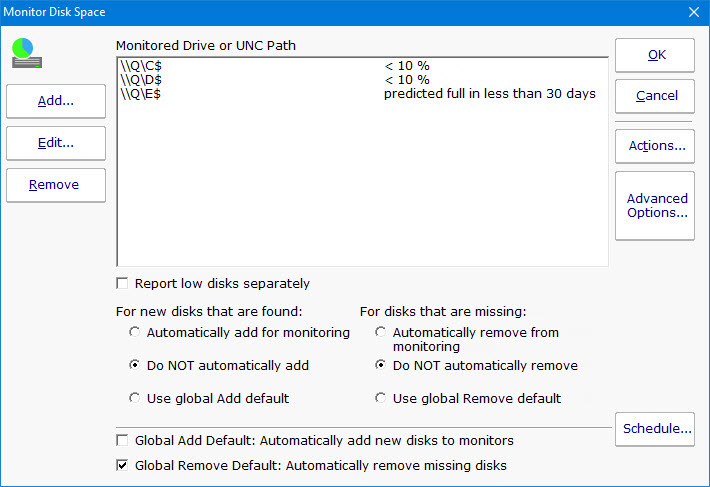
The radio buttons at the bottom of the dialog let you indicate what should happen if new unmonitored drives are detected during a scan. You can automatically add them, not add them, or do whatever the global (shared among all Disk Space monitors) default is. The default is shown and changed with the check box below the radio buttons.
If a new drive is found and added to the monitor, the average threshold for existing disks will be used for the new disk.
Drives (volumes) on non-Windows machines are shown in the Add dialog as well. PA Storage Monitor uses SNMP behind the scenes to get drive information from the hrStorage table. If drive/volume information is not showing up, make sure that the correct SNMP credentials have been specified.

Note: If the target server is monitored by a Satellite, the drive names will be retrieved from the Satellite during the configuration step.
If a drive\share\volume that you want to monitor does not show up, choose {manually enter path}, and then enter the UNC path to be monitored on the next dialog.

The Advanced Options button will let you give separate thresholds based on disk size. This is helpful when creating Monitor Templates that can be applied to multiple servers.

Once the drive to monitor is selected, specify the free space threshold.
When monitoring remote drives it is important to remember that the monitoring service will probably run as a different user than you are currently logged in with, and will most likely not be able to access mapped drives. The best way to specify a disk in this case is via UNC paths.
Note that one of the alert threshold options is to be alerted when a disk is predicted to be X days away from being full. This uses historical disk readings and trend analysis to predict when the disk will be full. This is very helpful for capacity planning.
Like all monitors, this monitor has standard buttons on the right for Adding Actions, setting Advanced Options and setting the Monitor Schedule.

The Disk Space monitor supports a number of disk space related reports. The Disk Space Summary is a good way to keep an eye on all disk space -- by default it shows a list of all servers with those with the least amount of free space at the top. Most of the reports can create bar and line charts, as well as tabular HTML and .CSV output.