- Solutions
-
- File Server: Ransomware Protection
- File Server: File Copy
- File Server: Audit File Access
- File Server: Storage growth reporting
- Licensing/Pricing
- Contact

When deploying any monitoring product to a large infrastructure, the time and cost of configuration can be considerable. The Smart Configuration feature makes this process much simpler when monitoring many similar servers.
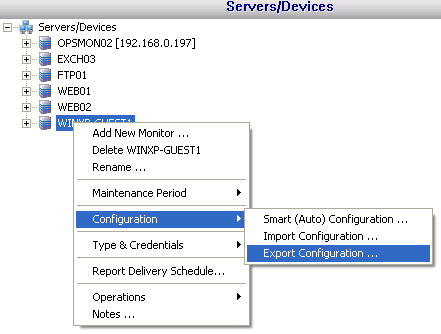
The best way to quickly configure many servers is to begin by completely configuring a single server. Get that server's monitors and actions exactly how you want them. Once that is complete, right click the computer and select "Export Server Configuration" to save the server's configuration to disk as a .cxml (Configuration XML Archive) file.
Next, press the Smart Configuration button. Step 1 (shown below in the dialog) asks you to select which servers need to be configured. This is where Smart Configuration earns it's name -- simply type or paste a list of server names into the first text box at the left (filled with SERVER1, SERVER2, etc in the example below). Then go down to step 2 and select the radio box on the right and browse to the saved .ConfArch file that contains the monitors and actions that you want to apply to all of the servers you just pasted.
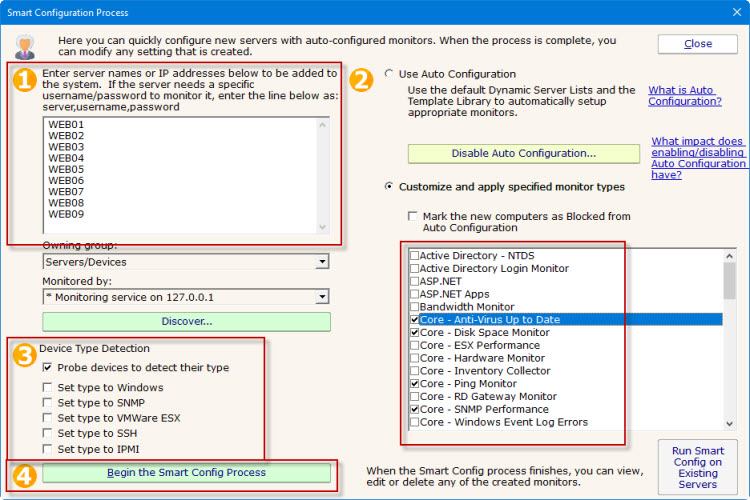
Now press "Begin the Smart Config process". Every monitor and action in the configuration file will be applied to each computer in the list, with the appropriate server name being substituted in each monitor and action as appropriate.
Literally hundreds of servers can quickly be created and configured this way.
Also see Bulk Configuration.