- Solutions
-
- File Server: Ransomware Protection
- File Server: File Copy
- File Server: Audit File Access
- File Server: Storage growth reporting
- Licensing/Pricing
- Contact

The File/Directory Size Monitor is designed to watch an individual file, a set of files, or an individual directory and execute actions (such as notifying you) if it grows too large.
To specify what should be watched, first choose a starting directory. If you are watching remote files/directories, it is important to remember that the monitoring service will most likely not have access to shared drives, so use UNC paths.
Next select whether a directory, directory with its child sub-directories, or a one or more files should be watched. To watch multiple files, use standard wild cards (ex: *.db for instance).
Last choose the growth conditions that should trigger the configured actions. They can include growth beyond a pre-set limit, or growth of a certain amount from one scan to the next.
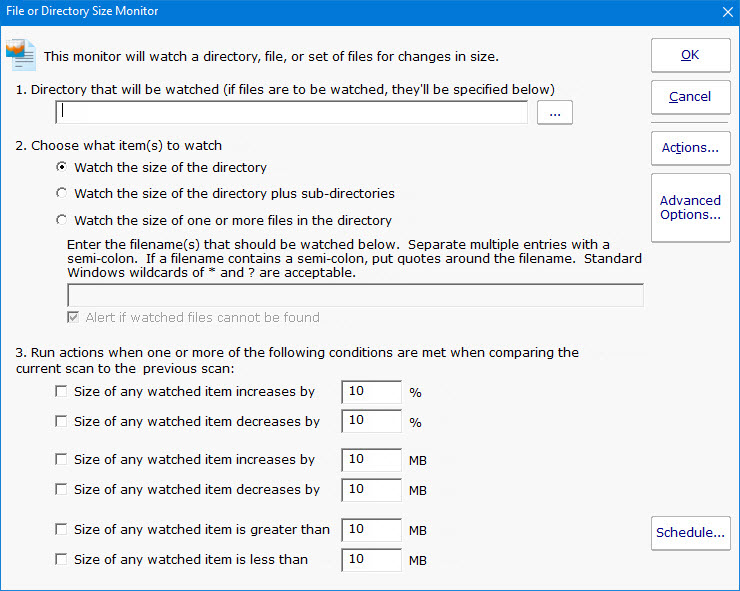
Like all monitors, this monitor has standard buttons on the right for Adding Actions, setting Advanced Options and setting the Monitor Schedule.

When this monitor runs, it records the measured value (directory size, directory size plus subdirectories, or file size) into a database. Those values can be charted or output to a .CSV file or tabular HTML report. You can specify the date range as well as summarization level (hourly, daily, weekly, monthly).