- Solutions
-
- File Server: Ransomware Protection
- File Server: File Copy
- File Server: Audit File Access
- File Server: Storage growth reporting
- Licensing/Pricing
- Contact

The Service Monitor watches the same system services that can be seen from the Administrator Tools Services applet (services.msc). If a service is not running, actions are fired (which could notify you and/or restart the service for example). The Restart Service action is typically attached to this monitor.
Watch the training video How to Add a Service Monitor in PA Server Monitor.
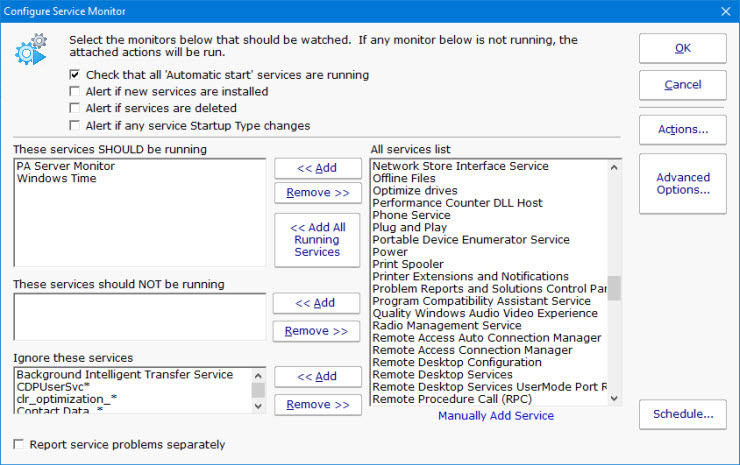
There are a lot of different parts to this monitor, so we'll take them one at a time.

The easiest way to use this monitor is to check the "Check that all 'Automatic Start' services are running". Every time the monitor runs, the service list is fetched and if a service is set to Automatic start isn't running, alerts will fire.

This option simply fires alerts when a new service is first seen, or if a service that was once registered is no longer there.

This option simply fires alerts when service's Startup Type changes.

This box lists all of the service that are currently listed on the target server. It will match the list you see in services.msc. If you can see this list, the monitor is able to actively communicate with the target server (even if you are monitoring a server at a remote site via a Satellite Monitoring Service).
Occasionally you may come across a service that is added and removed during some procedure. If you want to ignore a service like that, you can click the "Manually Add Service" link at the bottom to temporarily add it to the "All services list". Once it's there, you can add it to the Ignored service list so it won't be alerted on.

If you have services that need to be running (perhaps they aren't "Automatic Start", or you don't want to monitor all "Automatic Start" services with the check box above), you can list them here.

Indicate any service that should NOT be running here. For example, some organizations will disable a service because of a security policy. If that service is ever running, it would need to be brought to someone's attention.

A number of services start and stop on their own during normal usage. You probably don't want to be notified about those services, so you can indicate they should be ignored. Ignoring a service means it will be ignored from all other checks specified above. PA Server Monitor automatically adds a few common auto-stop services to this list automatically.

This option will tell the service to send alerts for each service that gose into alert mode instead of grouping alerts together.
Like all monitors, this monitor has standard buttons on the right for Adding Actions, setting Advanced Options and setting the Monitor Schedule.

Service up or down data is recorded every time the monitor runs. You can define a time period, and optionally a summarization (hourly, daily, weekly, monthly) to create an uptime report for the service.