- Solutions
-
- File Server: Ransomware Protection
- File Server: File Copy
- File Server: Audit File Access
- File Server: Storage growth reporting
- Licensing/Pricing
- Contact

The Process monitor check how many instances of a target process are running. It then compares that to the threshold and fires actions as needed.
The process may be running locally, or remotely. PA Server Monitor can monitor remote processes on Windows servers via WMI or SNMP, as well as processes on remote Linux/Unix servers via SNMP.
Watch the training video How to Monitor if a Process is Running.
To monitor a process, create a monitor of type Process Monitor on the computer that hosts the target process. You will see the dialog shown below.
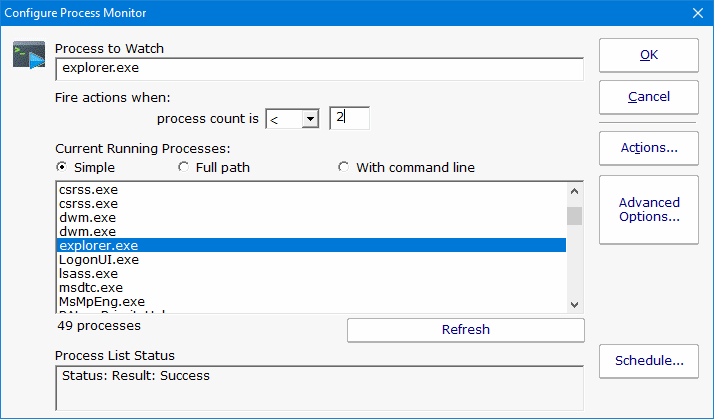
The list "Current Running Processes" should quickly fill with a list of processes that are now running on the target machine. Select the process from the list and specify the alert condition. If the process list doesn't fill, check the WMI and/or SNMP credentials for the server.
Note: If the target server is monitored by a Satellite, the available processes will be retrieved from the Satellite during the configuration step.
If the process name does not appear in the list, then you can type its name manually into the "Process to Watch" text box.
Like all monitors, this monitor has standard buttons on the right for Adding Actions, setting Advanced Options and setting the Monitor Schedule.

Process up or down data is recorded every time the monitor runs. You can define a time period, and optionally a summarization (hourly, daily, weekly, monthly) to create an uptime report for the process.