- Solutions
-
- File Server: Ransomware Protection
- File Server: File Copy
- File Server: Audit File Access
- File Server: Storage growth reporting
- Licensing/Pricing
- Contact

The Ping Monitor sends out a typical ICMP 'ping' message to the specified host as often as is specified by the Schedule button. If the host doesn't respond before the given timeout value, the configured actions are fired.
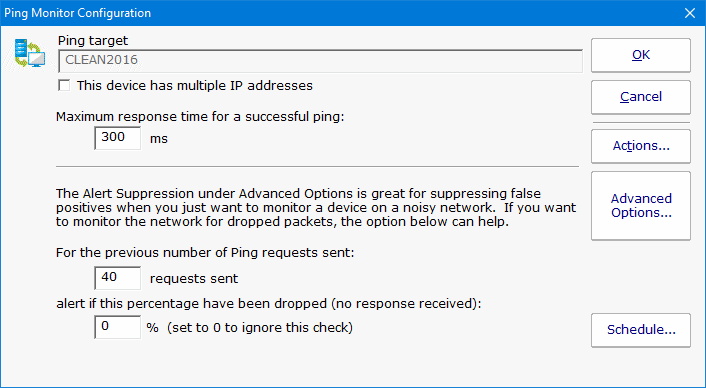
The host name is resolved each time the ping happens which allows this monitor to also watch DNS look up. The time to resolve an address is not counted towards the total ping timeout.
There are a variety of internal operations that can also cause ping requests to be sent (for example, a ping might be sent if a monitor has a dependency on a Ping monitor, but the Ping monitor hasn't run recently). The results of these internal pings are cached for a few seconds to keep from doing duplicate work.
When the ping monitor runs, it checks the cache to see if there was a successful ping recently (within the past 10 seconds by default). If there was, it reports success.
If you want to ping more often than once every 10 seconds, you should change the registry value:
If a fresh enough value is not found in the cache, a ping request is sent on the network. If a successful response is received within the specified time frame, all is well.
If no response is received, or a response is received but it took too long, up to two more ping requests are sent. If any are received successfully within the specified time frame, the monitor considers this a success.
The Ping monitor can also alert if the percent of dropped requests passed a defined threshold. This percentage is based on all ping requests sent to the host, whether sent because of retries or internal operations. Requests satisfied from cache are not counted since a ping request was not actually sent out on the network in this case. The calculation is based on the past 128 ping results.
Ping result times are recorded for report generation. If a ping response is never returned, a time of 30,000 is used to indicate the failure in reports. The Uptime Report is very useful with Ping data.
Many system administrators only want to be alerted after a few ping responses are missed. Configure that under the Alert Suppression setting in Advanced Options.
Like all monitors, this monitor has standard buttons on the right for Adding Actions, setting Advanced Options and setting the Monitor Schedule.

The Ping Server monitor can create reports based on the ping response from the target server/device. This data can be charted as well as output in .CSV or HTML tabular form. In addition, you can define what 'up' means and create an uptime report showing a percentage of uptime over a given time period.