- Solutions
-
- File Server: Ransomware Protection
- File Server: File Copy
- File Server: Audit File Access
- File Server: Storage growth reporting
- Licensing/Pricing
- Contact

The Mail Server monitor can watch a POP3, IMAP4 or SMTP mail server on a monitored computer to ensure it is up and running. This is accomplished by logging into the server using one of the above protocols using credentials that you supply.
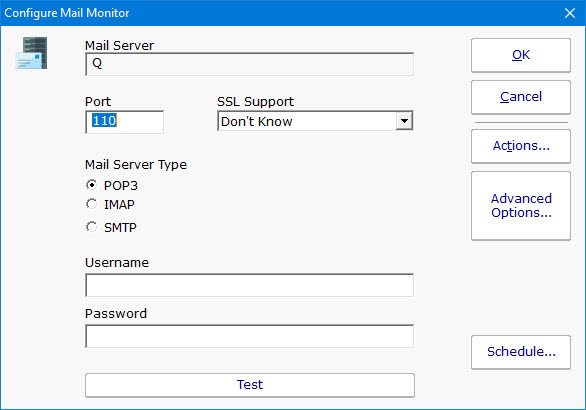
Above you can see the configuration dialog for configuring the Mail Server monitor. The mail server name is taken from the server that the monitor is attached to. The mail server type and optional username and password need to be entered. When the server type is selected, the standard port is entered for you, but you can also change it for non-standard configurations.
SSL connections (POPS, IMAPS and SMTPS) are supported. If you don't know which setting to use, select "Don't Know" and press the Test button. Each option will be tried and the one that works will be selected for you automatically.
When you press the Test button, the mail settings are sent to the monitoring service (Central Monitoring Service or Satellite) and are tried there. The test results will be sent back and displayed.
Like all monitors, this monitor has standard buttons on the right for Adding Actions, setting Advanced Options and setting the Monitor Schedule.

The Mail Server monitor can create reports based on the time to connect to the mail server. This data can be charted as well as output in .CSV or HTML tabular form. In addition, you can define what 'up' means and create an uptime report showing a percentage of uptime over a given time period.