- Solutions
-
- File Server: Ransomware Protection
- File Server: File Copy
- File Server: Audit File Access
- File Server: Storage growth reporting
- Licensing/Pricing
- Contact

PA Server Monitor can associate a set of SNMP (Simple Network Management Protocol) credentials with a monitored computer or device.
The following context menu choice allows you to see the Set SNMP Credentials dialog. If you don't see the SSH menu, you need to
set the Server Type.
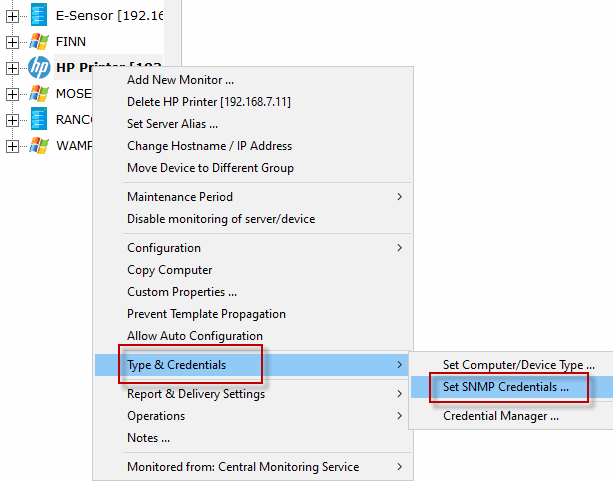
The Set SNMP Settings dialog let you to set SNMP credentials that are appropriate for the server being monitored.
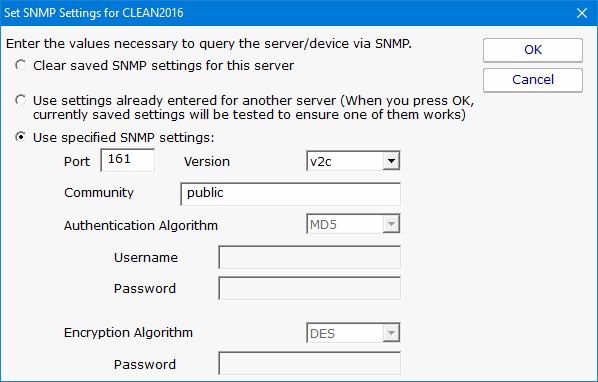
This dialog allows you to set the following items:
The SNMP credentials are used any time SNMP is used to access the target computer or device on the network.
All credentials are protected using the Microsoft best practice of encrypting them with a machine-specific key, which means they can only be decrypted on the same computer they were encrypted on.
You can see and update current credentials in the system via the Credential Manager.