- Solutions
-
- File Server: Ransomware Protection
- File Server: File Copy
- File Server: Audit File Access
- File Server: Storage growth reporting
- Licensing/Pricing
- Contact

PA Server Monitor needs a place to store the data that it collects during operation. There are two choices available for data storage.
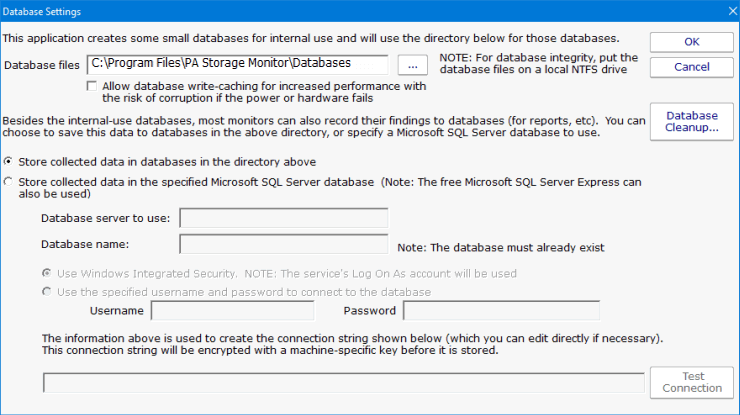
SQLite is a highly reliable open-source database. By default, PA Server Monitor stores all of its data in SQLite databases. This is the choice that you make by selecting the radio button titled "Store collected data in databases in the directory above." This is the simplest choice available and is the one that most users make when using PA Server Monitor.
Database files will be created and stored in the directory specified. Even if MS SQL Server is chosen for the database, a small amount of data will still be stored in the specified database directory.
To use SQL Server for storage, you need to install the SQL Server Native Client library, which is Microsoft's latest database connection technology. The SQL Server Express databases are fine for most installations, but do be aware that they limit the total database size to 10GB (for SQL Server 2008 R2 Express).
If you did not install the Native Client Library at installation time, you can now
by launching the installation file named sqlncli.msi, which will be located in the
home directory of PA Server Monitor (normally C:\Program Files\PA Server Monitor.)
The following configuration data needs to be specified to use SQL Server:
If you do not need or wish to use SQL Server as the database for PA Server Monitor, the SQL Server Native Client Library does not need to be installed.
If you change the database settings, you will be prompted whether you want to copy your existing data from the current database to the new database. Depending on the size of your current databases, this can take a while (a large installation with 6GB of databases can take a day for the transfer).
No maintenance is required for the databases. All monitors automatically remove old data from the databases automatically to help control database growth. You can control how many days of data is kept for the monitors via the Database Cleanup button.
