- Solutions
-
- File Server: Ransomware Protection
- File Server: File Copy
- File Server: Audit File Access
- File Server: Storage growth reporting
- Licensing/Pricing
- Contact

The Execute Script Monitor allows you to write your own custom scripts in the VBScript, JavaScript, PowerShell languages, or via an SSH connection to a host. You can check anything that your script can access. For VBScript, JavaScript and PowerShell, this monitor makes use of the applicable scripting engine that is already installed on nearly all Windows computers.
The script window is where you enter your script. The script can do anything that can be done in the selected language (including creating external components if available) with all the standard restrictions.
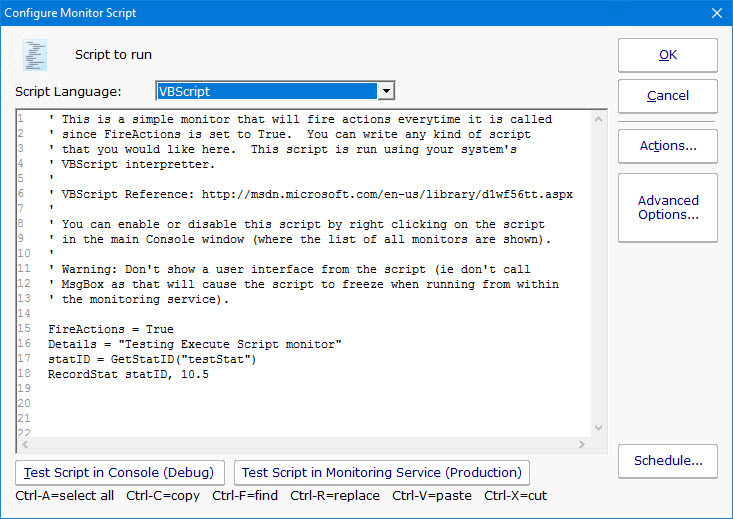
There are two Test buttons. One will run the script within the Console. The other will send the script to the monitoring service that is monitoring the target computer (Central Monitoring Service or a Satellite) and run the script there. This helps find any problems that might come up from the script possibly running on a different machine, or running as a different user (the service Log As user).
Keep in mind that when the script runs, it might run on a different computer than where you are editing it. That means drive mappings, HKEY_CURRENT_USER registry hive, Internet Explorer settings and the currently running user will often be different.
IMPORTANT: Do not show any user interface elements in the script -- they will not be visible in the monitoring service and will block the script from ever completing.
Besides the scripting language's own objects and elements, the following additional global variables and methods are available within each scripting environment:
A good VBScript reference is available at: http://msdn.microsoft.com/en-us/library/d1wf56tt.aspx
This read-only string variable is the name of the computer that the monitor is attached to.
Example:
This function retrieves the named value of a custom property. It checks the Monitor first, and if not found, checks the monitor's owning computer, and then the computer's group, and then the group's parent group, etc.
Custom properties can be set on Groups, Computers and Monitors by right-clicking on the item and choosing the Custom Properties menu.
Example:
This is a string value. This value is passed to any attached actions as the details for the action (ie the content of an email
notification for example).
Example:
This is a boolean value. If the value is set to True,
actions attached to the monitor will fire. If it is False, they will not fire. The value defaults to False.
Example:
GetStatID and RecordStat are used together to record numeric data values to the database for reports.
GetStatID is a function that takes a single string value and returns an integer statID. The string value should be a useful name
to you, such as the name of the thing you're probing with the script. Including the server/device name in the string would be a good idea
if a similar script will run on multiple computers -- it will make it easier to choose the specific data that you want when you
create reports.
Example:
GetValue method takes a text name and returns the value that was stored earlier via the StoreValue call described below. If nothing was ever stored with that name, an empty string is returned.
Example:
The StoreValue method takes a text name, and a text value and stores it. This named value can be retrieved later (even when the script runs next) via GetValue. Note that these values will be persisted in the configuration database and kept in memory with the monitor, so they should be kept relatively small (a few hundred characters long or less).
Example:
Request an inventory value for the current computer, or a different one. An inventory propertyID must be used to specify which inventory value to retrieve. An optional ComputerID value
can be used to get the inventory value from a computer other than the current computer. If a property can have multiple values (CPU Names for example), each one will have a newline character appended.
Example:
The inventoryID values are given below. Note that not all computers/devices will have all inventory values, and some may have none (especially if an Inventory Collector monitor is not added to the computer).
| Anti-virus Version | 38 |
| Anti-virus Pattern File | 39 |
| Anti-virus Pattern File Date | 40 |
| Anti-virus Status | 41 |
| Operating System | 18 |
| OS Architecture | 19 |
| OS Version | 20 |
| OS Last Boot Time (_time_t UTC value) | 21 |
| OS Current Time (_time_t UTC value) | 22 |
| CPU Count | 13 |
| CPU Name (multi value) | 15 |
| CPU Number of Cores (multi value) | 16 |
| CPU Clock Speed (multi value) | 17 |
| Display Name | 6 |
| Drive Status (multi value) | 23 |
| Domain | 9 |
| Manufacturer | 10 |
| Page File size in MB | 24 |
| RAM in MB | 14 |
| System Architecture | 12 |
| System Model | 11 |
| Time Zone Offset | 8 |
| Uptime % this month | 28 |
| Uptime % last month | 29 |
Returns the numeric value that uniquely identifies this computer (Computer ID - CID) within the application. Useful in conjunction with the External API.
Example:
The name of the group that the computer the monitor is attached to belongs in, with child groups delimited with a > (ie, Servers/Devices > Austin > Lab )
Example:
This method will take the current value of FireActions and Details and report the result as though the monitor had finished. This is a way for
a monitor to report multiple individual errors, similarly to how some other monitors have a "report each event separately" check box.
Example:
This method sends an email message to the recipient that you choose. This method can also send the email in HTML format if it sees the <!DOCTYPE in the body of the message.
Example:
Custom Properties can be used in directory paths, email messages, scripts and other places. Your script can set a Custom Property on a computer by giving it's ID (first parameter). If the ID is 0, the computer the monitor is running on will be targeted.
Example:
The Custom Property DISPLAYED_NOTES is the value you can set by right-clicking a computer and selecting Notes. Notes show up at the top of a Server Status Report.
This VBScript method takes a single integer value, which is the number of milliseconds that the script should stop and sleep. Be careful about
using this: causing too many monitors to sleep for very long means other monitors may not get run.
Example:
This method takes a string value and appends it to the service's log file (useful for debugging scripts). The line will start with MONITOR_SCRIPT_LOG.
Example:
This read-only string variable is the name of the computer that the monitor is attached to.
Example:
This function retrieves the named value of a custom property. It checks the Monitor first, and if not found, checks the monitor's owning computer, and then the computer's group, and then the group's parent group, etc.
Custom properties can be set on Groups, Computers and Monitors by right-clicking on the item and choosing the Custom Properties menu.
Example:
This is a string value. This value is passed to any attached actions as the details for the action (ie the content of an email
notification for example).
Example:
This is a boolean value. If the value is set to True,
actions attached to the monitor will fire. If it is False, they will not fire. The value defaults to False.
Example:
GetStatID and RecordStat are used together to record numeric data values to the database for reports.
GetStatID is a function that takes a single string value and returns an integer statID. The string value should be a useful name
to you, such as the name of the thing you're probing with the script. Including the server/device name in the string would be a good idea
if a similar script will run on multiple computers -- it will make it easier to choose the specific data that you want when you
create reports.
Example:
GetValue method takes a text name and returns the value that was stored earlier via the StoreValue call described below. If nothing was ever stored with that name, an empty string is returned.
Example:
The StoreValue method takes a text name, and a text value and stores it. This named value can be retrieved later (even when the script runs next) via GetValue. Note that these values will be persisted in the configuration database and kept in memory with the monitor, so they should be kept relatively small (a few hundred characters long or less).
Example:
Request an inventory value for the current computer, or a different one. An inventory propertyID must be used to specify which inventory value to retrieve. An optional ComputerID value
can be used to get the inventory value from a computer other than the current computer. If a property can have multiple values (CPU Names for example), each one will have a newline character appended.
Example:
The inventoryID values are given below. Note that not all computers/devices will have all inventory values, and some may have none (especially if an Inventory Collector monitor is not added to the computer).
| Anti-virus Version | 38 |
| Anti-virus Pattern File | 39 |
| Anti-virus Pattern File Date | 40 |
| Anti-virus Status | 41 |
| Operating System | 18 |
| OS Architecture | 19 |
| OS Version | 20 |
| OS Last Boot Time (_time_t UTC value) | 21 |
| OS Current Time (_time_t UTC value) | 22 |
| CPU Count | 13 |
| CPU Name (multi value) | 15 |
| CPU Number of Cores (multi value) | 16 |
| CPU Clock Speed (multi value) | 17 |
| Display Name | 6 |
| Drive Status (multi value) | 23 |
| Domain | 9 |
| Manufacturer | 10 |
| Page File size in MB | 24 |
| RAM in MB | 14 |
| System Architecture | 12 |
| System Model | 11 |
| Time Zone Offset | 8 |
| Uptime % this month | 28 |
| Uptime % last month | 29 |
Returns the numeric value that uniquely identifies this computer (Computer ID - CID) within the application. Useful in conjunction with the External API.
Example:
The name of the group that the computer the monitor is attached to belongs in, with child groups delimited with a > (ie, Servers/Devices > Austin > Lab )
Example:
This method will take the current value of FireActions and Details and report the result as though the monitor had finished. This is a way for
a monitor to report multiple individual errors, similarly to how some other monitors have a "report each event separately" check box.
Example:
This method sends an email message to the recipient that you choose. This method can also send the email in HTML format if it sees the <!DOCTYPE in the body of the message.
Example:
Custom Properties can be used in directory paths, email messages, scripts and other places. Your script can set a Custom Property on the computer whose ID is given (first parameter), or use 0 to indicate the computer the monitor is running on should be targeted.
Example:
The Custom Property DISPLAYED_NOTES is the value you can set by right-clicking a computer and selecting Notes. Notes show up at the top of a Server Status Report.
This method takes a single integer value, which is the number of milliseconds that the script should stop and sleep. Be careful about
using this: causing too many monitors to sleep for very long means other monitors may not get run.
Example:
This method takes a string value and appends it to the service's log file (useful for debugging scripts). The line will start with MONITOR_SCRIPT_LOG.
Example:
PowerShell interaction happens via the $mon object.
SetMonitorStatus is a function that sets the status of any monitor. This function takes three values: Monitor ID, Monitor Status, and Status Text.
The Monitor ID is assigned in the monitoring service and you can find the ID value by showing the IDs from the View menu and then looking in the navigation colunm. If you
use 0 for the Monitor ID the function will change the staus of the monitor the action is attached to. There are four statuses that are available: msOK, msAlert, msError,
and msDISABLED. The Status Text is the message that you can supply that is listed for the monitor and will be shown in reports.
Example:
Possible values:
| Monitor Status | Values |
| OK | $mon.msOK |
| Alert | $mon.msAlert |
| Alert Show as Green | $mon.msALERT_GREEN |
| Alert Show as Red | $mon.msALERT_RED |
| Error | $mon.msError |
| Disabled | $mon.msDISABLED |
This read-only string variable is the name of the computer that the monitor is attached to.
Example:
This function retrieves the named value of a custom property. It checks the Monitor first, and if not found, checks the monitor's owning computer, and then the computer's group, and then the group's parent group, etc.
Custom properties can be set on Groups, Computers and Monitors by right-clicking on the item and choosing the Custom Properties menu.
Example:
This is a string value. This value is passed to any attached actions as the details for the action (ie the content of an email
notification for example).
Example:
This is a boolean value. If the value is set to True,
actions attached to the monitor will fire. If it is False, they will not fire. The value defaults to False.
Example:
The GetCredentials function lets your script request credentials for use within the script. The relevent setting must be enabled (disabled by default) in the Security Protected Settings. This function takes five parameters: A server name/key value, and a credential type, and ref/out parameters for the username, information/domain field, and the password.
Credential types can be one of: ctWIN, ctESX, ctSSH, ctAWS, ctCUSTOM
Example:
Because of the concern of scripts exfiltrating credentials, we recommend locking monitors or actions that use the GetCredentials function.
The GetCredentialsObj function lets your script request credentials for use within the script, and which are returned in a PSCredentials object. This is safer than the GetCredentials function above. The relevent setting must be enabled (disabled by default) in the Security Protected Settings. This function takes two parameters: A server name/key value, and a credential type.
Credential types can be one of: ctWIN, ctESX, ctSSH, ctAWS, ctCUSTOM
If the credential has an information/domain field, it will be combined with the username field in the PSCredential object as domain\username.
Example:
Because of the concern of scripts exfiltrating credentials, we recommend locking monitors or actions that use the GetCredentialsObj function.
GetMonitorList is a function that uses the Server ID to return a list of monitors assigned to the server and the monitor's attributes.
The server ID can be for any server and if no server is given the default will be the current server that this monitor is assigned to.
The returned value is a Hashtable that can be iterated through to find the value needed.
Example:
The monitor's attributes values:
| Status | status |
| Error Text | errText |
| Dependency | depends_on |
| Title | title |
| Error Action IDs | errActionIDs |
| Scheduled Next Run Time | nextRun |
| Time in Error (seconds) | inErrSeconds |
| Fixed Action ID | fixedActionIDs |
| Last Run Time | lastRun |
GetServerList is a function that returns a list of servers assigned to a group and the server's attributes. Two parameter are needed for
this function; GroupID and include Child Groups. If no GroupID is used the default 0 is used, which is the entire list of servers at the
root level. The second parameter is a switch used to return or not return servers that are in child groups under the starting group.
Use to 0 to return all servers and 1 to return servers at the parent level only. The returned value is a Hashtable that can
be iterated through to find the value needed.
Example:
The server's attributes values:
| Server Name | name |
| Group Level | group |
| Group ID | groupID |
| Status | status |
| Alias for Server | alias |
GetStatID and RecordStat are used together to record numeric data values to the database for reports.
GetStatID is a function that takes a single string value and returns an integer statID. The string value should be a useful name
to you, such as the name of the thing you're probing with the script. Including the server/device name in the string would be a good idea
if a similar script will run on multiple computers -- it will make it easier to choose the specific data that you want when you
create reports.
Example:
The GetValue method takes a text name and returns the value that was stored earlier via the StoreValue call described below. If nothing was ever stored with that name, an empty string is returned.
Example:
The StoreValue method takes a text name, and a text value and stores it. This named value can be retrieved later (even when the script runs next) via GetValue. Note that these values will be persisted in the configuration database and kept in memory with the monitor, so they should be kept relatively small (a few hundred characters long or less).
Example:
The name of the group that the computer the monitor is attached to belongs in, with child groups delimited with a > (ie, Servers/Devices > Austin > Lab )
Example:
Request an inventory value for the current computer, or a different one. An inventory propertyID must be used to specify which inventory value to retrieve. An optional ComputerID value
can be used to get the inventory value from a computer other than the current computer. If a property can have multiple values (CPU Names for example), each one will have a newline character appended.
Example:
The inventoryID values are given below. Note that not all computers/devices will have all inventory values, and some may have none (especially if an Inventory Collector monitor is not added to the computer).
| Anti-virus Version | 38 |
| Anti-virus Pattern File | 39 |
| Anti-virus Pattern File Date | 40 |
| Anti-virus Status | 41 |
| Operating System | 18 |
| OS Architecture | 19 |
| OS Version | 20 |
| OS Last Boot Time (_time_t UTC value) | 21 |
| OS Current Time (_time_t UTC value) | 22 |
| CPU Count | 13 |
| CPU Name (multi value) | 15 |
| CPU Number of Cores (multi value) | 16 |
| CPU Clock Speed (multi value) | 17 |
| Display Name | 6 |
| Drive Status (multi value) | 23 |
| Domain | 9 |
| Manufacturer | 10 |
| Page File size in MB | 24 |
| RAM in MB | 14 |
| System Architecture | 12 |
| System Model | 11 |
| Time Zone Offset | 8 |
| Uptime % this month | 28 |
| Uptime % last month | 29 |
Returns the numeric value that uniquely identifies this computer (Computer ID - CID) within the application. Useful in conjunction with the External API.
Example:
This method will take the current value of FireActions and Details and report the result as though the monitor had finished. This is a way for
a monitor to report multiple individual errors, similarly to how some other monitors have a "report each event separately" check box.
Example:
This method allows you to do a "Run Now" on a monitor from within the script. The method puts the monitor at the top of the queue to be run next, and returns before the monitor starts. The method takes a monitor ID to specify which monitor to run. Monitor IDs can be viewed in the Console by enabling the View > Show Object IDs in Navigation Tree menu item.
Be careful not to create a loop of running a monitor which runs a monitor which runs a monitor, etc.
Example:
This method sends an email message to the recipient that you choose.
Example:
Custom Properties exist on groups, computers and monitors. This function lets you set the custom property on a computer. You can specify the computer ID in the first parameter,
or set it to 0 to indicate the computer the monitor is running on should be targeted.
Example:
The Custom Property DISPLAYED_NOTES is the value you can set by right-clicking a computer and selecting Notes. Notes show up at the top of a Server Status Report.
SetMonitorStatus is a function that sets the status of the Excute Script monitor if FireActions is set to true (this function is ignored if FireActions is false). There are three statuses that are available: msOK, msAlert, and msError. The default is msAlert.
Example:
Possible values:
| Monitor Status | Value |
| OK | $mon.msOK |
| Alert | $mon.msAlert |
| Error | $mon.msError |
These values return username, domain and password for the target server if BOTH of the below conditions are met:
This returns a PSCredential object for the target server if BOTH of the below conditions are met:
If either of the conditions above are not met, a null value is returned.
If the credentials contain a username and a domain, the PSCredential object's UserName value will be domain\username.
Example:
This method takes a string value and appends it to the service's log file (useful for debugging scripts). The line will start with MONITOR_SCRIPT_LOG.
Example:
The PowerShell cmdlet takes two parameters. The first parameter specifies timer in seconds (-s) or milliseconds (-m) and the second is an integer that specifies period of time.
Example:
SSH is a little different than the others. In this case, your script will be sent to the remote computer/device to run. The resulting terminal output is scanned
for the special keywords below, and they will be 'executed' in the monitoring service when the script finishes. The keywords must start in the very first column to be recognized. One way to achieve
this is to output the line with a new line character right before the keyword, as in this example below:
This is function that lets you pass the monitor ID, a status value, and a test description to set as the new status for the monitor given by the id. The monitor IDs can be obtains in the Console by setting View > Show Object IDs, or from the GET_MONITOR_INFO External API command.
Possible values for status:
| Monitor Status | Values |
| OK | 1 |
| Alert | 2 |
| Alert Show as Green | 17 |
| Alert Show as Red | 18 |
| Error | 3 |
| Disabled | 6 |
This is a string value. This value is passed to any attached actions as the details for the action (ie the content of an email
notification for example). This particular value can span multiple lines. The value is terminated when a ") is seen.
Example:
This is a boolean value. If the value is set to true,
actions attached to the monitor will fire. If it is false, they will not fire. The value defaults to false.
Example:
This 'function' will record a statistic returned from the script to the database. It is equivalent to GetStatID and RecordStat in the other languages above.
The first parameter is a string value. The string value should be a useful name
to you, such as the name of the thing you're probing with the script. The second value is a numeric value that will be stored.
Example:
This method sends an email message to the recipient that you choose.
Example:
The SSH script can also use replacement variables that are replaced before the script is sent to the host. These include the following:
Like all monitors, this monitor has standard buttons on the right for Adding Actions, setting Advanced Options and setting the Monitor Schedule.
Check the size of a specific file and record to a database
Check if the newest file is older than 6 hours old (to ensure new files are being created)
Launch a program and check the result code
Monitor UDP ports using Microsoft PortQry
The Javascript and VBScript scripting engines are identical, other than the syntax of the language. That means you can look at all of the VBScript examples and make simple changes so it uses Javascript syntax. For example:
VBScript:
	Set p = CreateObject("WScript.Shell")
	FireActions = True
	Sleep "100"

Javascript:
	object p = CreateObject("WScript.Shell");
	FireActions = True;
	Sleep(100);
With that in mind, go to the VBScript examples.
$mon.FireActions = $false
$mon.Details = ""
$highCount = 1000
$folder = "C:\Temp"
$files = Get-ChildItem $folder -Force

if ($files.Count -gt $highCount)
{
	$mon.FireActions = $true
	$mon.Details = "File Count is " + $files.Count
}
Launch a PS program and record results
$mon.FireActions = $false
$statID = $mon.GetStatID("VMGUEST1_5z_free")
$mon.Details= &powershell.exe "c:\skripte\VM_LUN_Freeperc.ps1 VC1 vmguest1_5z"
$mon.RecordStat($statID, $mon.Details)
Thanks goes out to Peter Strauss at KELAG for this
$Mon.FireActions = $False
$Name = $Mon.ComputerName
$Mon.Details = ""
$Folder = "\\" + $Name + "\Sysvol"

If ((Test-Path $Folder) -eq $False)
{
	$Mon.FireActions = $true
	$Mon.Details = "SYSVOL is not accessible on " + $Name
}
Else
{
	$Mon.Details = "SYSVOL is accessible on " + $Name
	$Mon.FireActions = $False
}
Thanks goes out to Joel Ashman at Progeny Systems Corporation for this
#Note: Requires AD RSAT tools on PA Server for RepAdmin.exe

$Mon.FireActions = $False
$Mon.Details = ""

$Name = $Mon.ComputerName

$Replication = Repadmin /ShowRepl $Name /CSV | ConvertFrom-CSV | Where {$_.'Number of Failures' -gt 0 } | Select -Unique 'Source DSA' | Sort 'Source DSA'

If ($Replication)
{
	$String = ""
	$String += "The Domain Controller $($Name.ToUpper()) is having difficulty replicating The following servers:`n`n"

	$String += " Server`n"

	$String += " --------`n"


	ForEach ($ReplError in ($Replication ))

	{

		$Source = $ReplError.'Source DSA'

		$String += " " + $Source + "`n"

	}

	$Mon.FireActions = $True

	$Mon.Details = $String

}

Else

{

	$Mon.FireActions = $False

	$Mon.Details = "Replication is now functioning for Domain Controller " + $Name

}
Thanks goes out to Joel Ashman at Progeny Systems Corporation for this
$vmList = Get-VM
foreach($vm in $vmList)
{
	$mon.Details += $vm.Name + ": " + $vm.State + ", " + $vm.Status + "`r`n"
	if($vm.Status -ne "Operating Normally")
	{
		$mon.FireAlerts = true
	}
}
Alert on Expiring Certificates
#LocalMachine is the Local Computer certificate folder

$targetFolder = "LocalMachine"
$maxDaysUntilExpiration = 60


$now = Get-Date
$target = Get-Date
$target = $target.AddDays($maxDaysUntilExpiration)

$mon.FireActions = $false

try
{
    	$certFolders = invoke-command -computername $mon.ComputerName -ScriptBlock { Get-ChildItem Cert:$using:targetFolder }
	foreach($store in $certFolders)
    	{
		$storeName = $store.Name
      		$path = $store.Location + "\" + $storeName
		$certs = invoke-command -computername $mon.ComputerName -ScriptBlock { Get-ChildItem -Recurse Cert:\$using:path }
		foreach($cert in $certs)
		{
			if(($cert.NotAfter -gt $now) -and ($cert.NotAfter -lt $target))
			{
				$mon.FireActions = $true
				$folderToShow = $path
				if($storeName -eq "Root")
				{
					$folderToShow = $folderToShow + " (Trusted Root Certificate Authorities)"
				}
				if($storeName -eq "AuthRoot")
				{
					$folderToShow = $folderToShow + " (Third-Party Root Certificate Authorities)"
				}
				if($storeName -eq "CA")
				{
					$folderToShow = $folderToShow + " (Intermediate Certificate Authorities)"
				}
				if($storeName -eq "My")
				{
					$folderToShow = $folderToShow + " (Personal)"
				}
				$mon.Details = $mon.Details + $folderToShow + "`r`nCert: " + $cert.Subject + "`r`n will expire on " + $cert.NotAfter + "`r`n`r`n"
			}
		}
	}
}
catch
{
	$mon.Details = "Exception in script :( " + $mon.Details
}
Monitor Window's License Activations
$mon.FireActions = $true
$mon.Details = "Windows OS is NOT activated"

$DNSHostName = $mon.ComputerName
try {
	$wpa = Get-WmiObject SoftwareLicensingProduct -ComputerName $DNSHostName `
	-Filter "ApplicationID = '55c92734-d682-4d71-983e-d6ec3f16059f'" `
	-Property LicenseStatus -ErrorAction Stop
}
catch {
	$status = New-Object ComponentModel.Win32Exception ($_.Exception.ErrorCode)
	$wpa = $null
}

$out = New-Object psobject -Property @{
	ComputerName = $DNSHostName;
	Status = [string]::Empty;
}

[bool] $fireAction = $true

if ($wpa) {
	:outer foreach($item in $wpa) {
		switch ($item.LicenseStatus) {
		0 {$out.Status = "Unlicensed"}
		1 {$out.Status = "Licensed"; $fireAction = $false; break outer}
		2 {$out.Status = "Out-Of-Box Grace Period"; break outer}
		3 {$out.Status = "Out-Of-Tolerance Grace Period"; break outer}
		4 {$out.Status = "Non-Genuine Grace Period"; break outer}
		5 {$out.Status = "Notification"; break outer}
		6 {$out.Status = "Extended Grace"; break outer}
		default {$out.Status = "Unknown value"}
		}
	}
}
else {$out.Status = $status.Message}

if(!$fireAction)
{
	$mon.FireActions = $fireAction
	$mon.Details = $DNSHostName + ": Windows OS is activated"
}
Thanks goes out to Joel Ashman at Progeny Systems Corporation for this
Monitor process memory usage