- Compare Editions
- Product Information
- Resources
- Licensing / Pricing
- Support
- Contact


File Integrity Monitoring (FIM)
Key Features:
watch now!




Real-time file and folder monitoring
Reports username, IP address and computer
Record creations, deletions, accesses, changes
Alert on file and folder moves and renames
Allow or prevent file access based on real-time rules
Monitor file and folder permission changes
Automatically block access for specific accounts
Does not rely on Windows Native Auditing
Compare Ultra vs Lite to see the differences.
For example, the Ultra Edition has Historical Reports and Advanced Alerts that help detect file copying activity/information leaks.
(Click for larger views. More screenshots in the PA File Sight Documentation)
Optionally store audit data in Microsoft SQL Server (Ultra Edition)
Robust security, your data stays on your servers - it is not sent to the cloud
Monitor remote servers as easily as local servers
Automatic failover with a hot standby server
Access control to limit who sees what reports
Backup SMTP server settings to help ensure alerts get out
See the detailed feature list for more information.
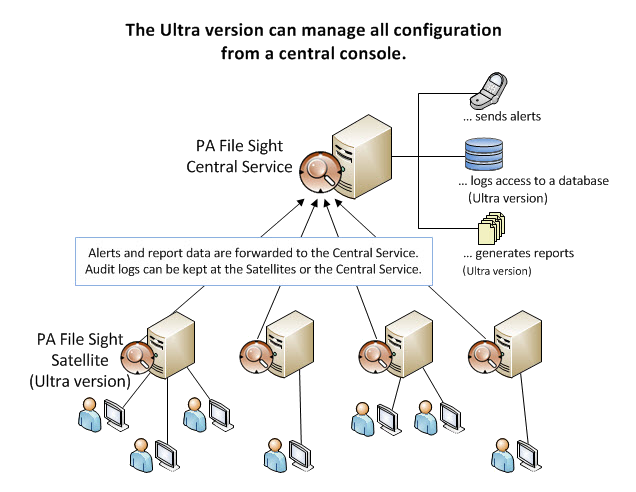
PA File Sight 10.1 is enterprise ready. Easily push out monitoring Satellites to watch remote servers and report back to a central system. Administer the system from anywhere.
Many compliance mandates require auditing file access and ensuring file integrity. PA File Sight can help meet those requirements, including those listed below:
PA File Sight can monitor log files. It can alert on writes (changes) to files, but ignore the expected appends to log files. This lets you detect log tampering.
File monitoring doesn't need to be complicated. PA File Sight can be installed and configured in literally a minute or two. Specify a local path and some file types to watch and it will get to work immediately.
 Monitoring Options
 Monitor User Activities
 Many Alert Types
 Configuration Security