- Compare Editions
- Product Information
- Pricing/Licensing
- Resources
- Support
- Contact

PA Server Monitor is able to monitor one or more computers for system events. Since it does not use remote software agents, there are generally two typical ways to install it:
The most popular installation method is to put PA Server Monitor on a single server and have it watch other servers (optionally including the server it is running on) and devices. Some clients even install PA Server Monitor on their desktop systems.
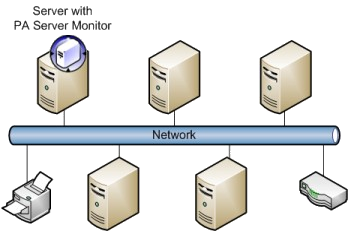
This method allows for a single installation, combined reporting, and no software installed on monitored servers. The only downside is the monitoring service needs to have access to the monitored resources on the remote servers. You can control which user credentials are used to access remote resources by setting the service Log On as user, as well as server-specific credentials which can be specified in the PA Server Monitor Console. Read more about remote monitoring hints here.
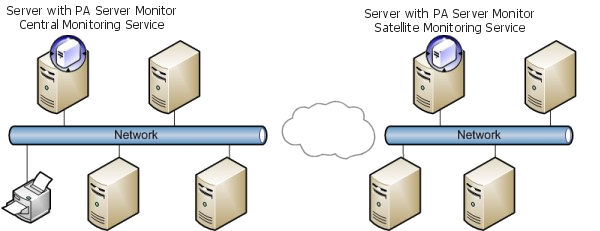
When monitoring remote sites, or servers across strict firewalls, it is usually easiest to install a Satellite Monitoring Service at the remote site. One Satellite will monitor all of the servers/devices on the remote LAN, and report back to the Central Monitoring Service. Using this method gives you central control, configuration and reporting.
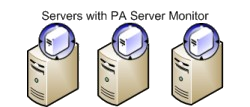
If the above method is not possible, perhaps because the servers are not connected via the network or there is no way to created a recognized account on the remote computer, it is also acceptable to install PA Server Monitor on each individual server.
For some applications this would be burdensome, but PA Server Monitor has taken steps to ease this job. First, PA Server Monitor installs very quickly. Second, once you have a server's monitors and alerts configured the way you want them, you can export that configuration to a file (via the Easy Configuration dialog) and then import that same configuration into each of the other servers.
Free Trial: Download PA Server Monitor and see for yourself how easy and flexible monitoring can be.
“We have relied on PA Server Monitor since 2007 in our mission critical environment. It has never failed us - ever. Thats hard to say about a lot of applications/services. Its rock solid and I have no hesitation in recommending it.”
Clinton T., logiforms, Canada