- Solutions
-
- File Server: Ransomware Protection
- File Server: File Copy
- File Server: Audit File Access
- File Server: Storage growth reporting
- Licensing/Pricing
- Contact

Power Admin monitoring products contain a variety of modules that monitor different server resources. In general, the server resources are accessed through one of three ways:
Do you need to monitor
servers in a DMZ?
Using the Satellite monitoring service that comes with the Ultra edition makes it much easer.
Distributed monitoring is easy. Check it out :)
Standard Protocol Ports would be those ports that are used by a protocol-specific monitor. For example, the Web Page monitor uses HTTP, and therefore (by default) port 80 to access the remote server. The SMTP server monitor uses a default port of 25, POP3 is a default of port 110, etc. These standard protocol monitors therefore use the port specified by the relevant standard.
Standard Ports:
See below for Windows Firewall rules for Windows.
Windows-specific monitors (Event Log monitor, Service monitor, Performance monitor, etc) use standard Windows RPC to access the underlying resources. Windows RPC uses TCP port 135 by default (although you can change this via tools on the Microsoft website). Because port 135 is targeted by much of the malware and worms on the Internet, we do not recommend opening that port on an Internet-facing firewall.
Besides port 135, RPC also uses a dynamic port range that gets established between the endpoints. Microsoft has more information, including firewall considerations:
Windows disk-based monitors (Disk Space monitor, File & Directory Change monitor, etc) use standard Windows SMB to access the underlying files and directories. Windows SMB uses TCP port 445 by default (although you can change this via tools on the Microsoft website). Because port 445 is targeted by much of the malware and worms on the Internet, we do not recommend opening that port on an Internet-facing firewall.
CIFS is another popular file sharing protocol that is basically the same as SMB. It is supported by Linux via SAMBA, and many other operating systems and devices.
Windows comes with a very strict firewall which is enabled by default. Go to Control Panel > Windows Firewall with Advanced Security to the incoming rules, and enable the Remote Administration rule to enable typical monitor access.
The Windows firewall is very strict and tightly locked down in its default configuration. For monitoring the server, consider enabling the following rules:
Disk Space
Event Log
Performance Counters
Ping
Services
Inventory Collection
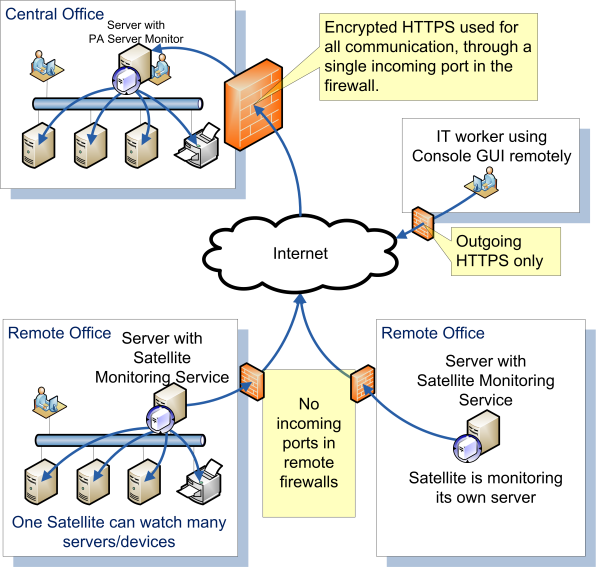
If opening firewall ports is not desired, a good option is to use PA Server Monitor's Satellite Monitoring Service. It is a small piece of software installed on a single server on the other side of the firewall that will monitor other devices on that side, and then report back to your central service. This works across firewalls as well as it does across the Internet at remote data centers.
Only a single incoming port for HTTPS traffic needs to be opened on the firewall.
View this page for more information.
To test if the ports are correctly opened, we recommend using a Windows app, like the Windows Event Log Viewer for example. Start eventvwr.msc and see if you can use it to connect to and view the remote Event Log. If this works, any firewalls in between are letting the requests through. For advanced firewalls like the one in Windows Server 2012, you should also try this with the Services applet (services.msc) and the Performance viewer (perfmon.msc) if you will be monitoring those resources.
“[We needed] a way to centrally monitor and manage multiple server issues in a manageable way. [PA Server Monitor] does that in spades. Its versatility in the scope of monitoring is extremely broad - and accurate.
Hands down. It's the bomb.”