- Solutions
-
- File Server: Ransomware Protection
- File Server: File Copy
- File Server: Audit File Access
- File Server: Storage growth reporting
- Licensing/Pricing
- Contact

Most monitors have a Schedule button in the lower right corner of their configuration dialog. When the mouse hovers over the Schedule button, the Schedule window is shown below:
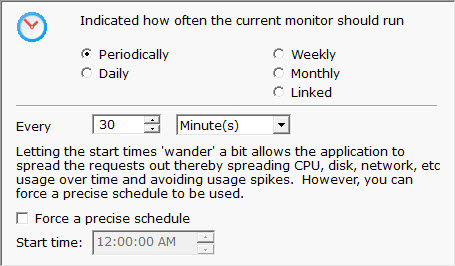
You can schedule the monitor to run using a time-based period, on a daily, weekly or monthly schedule.
An additional option, Linked, lets you specify that a monitor should run immediately after another monitor finishes. This is useful in cases where two monitors need to work together, or perhaps see the same underlying system state.

Advanced Options for most monitors will also let you specify a time during the week (in 30 minute increments) when a specific monitor should not be run. This might be useful during system backup for example.