- Compare Editions
- Product Information
- Resources
- Licensing / Pricing
- Support
- Contact


This is a tough problem. The user's computer certainly knows that a file is read from the disk or the network into the computer's memory. Unfortunately, once the data is in memory, it can't be tracked any further. It might be inside of Microsoft Word and displayed as a document on the screen, it might have been loaded into an FTP application and sent out onto the network, or it might have been loaded into a program that is sending it to the printer.
There are a few solutions for this.
The Trusted Applications monitor (for servers) and the Endpoint can both use rules to control file access. You can create a rule that prevents writing to either an external drive (USB drive) or to a local cloud folder using the FILE_PATH_IN_EXTERNAL_DRIVE or FILE_PATH_IN_CLOUD_FOLDER statements. You can receive alerts when this is attempted as well.
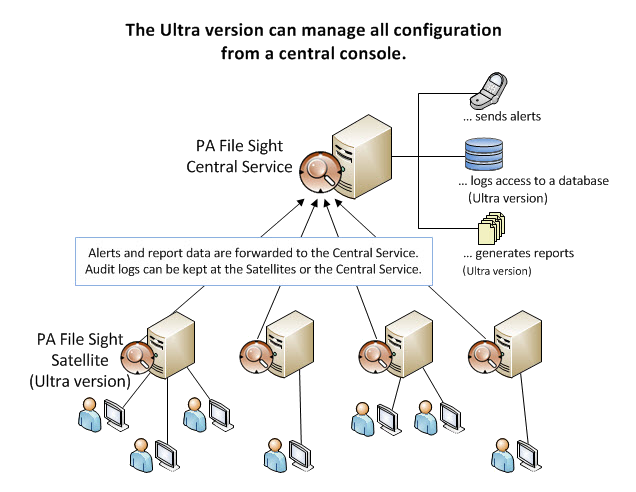
With the Ultra version of PA File Sight you can be alerted any time a user reads more than X amount of data (a number of files, or an amount of data) in Y amount of time. For example, it's unlikely that a user would open and read 50 Word documents in a one minute period of time. So if 50 Word documents are read by a single user within 1 minute, you have a pretty good guess that a directory copy probably just took place.
Read about the nuances and limits to the technology.
Watch the training video How to set up a monitor to detect file copying.
When the File Sight Endpoint is installed on a client computer, it will interact with the PA File Sight service to coordinate tracking files that come from the server. When it sees a file that is read from a server, it keeps track of which process (Word, WinZip, Windows Explorer, etc) read the file, and where that process wrote out any files. If it sees the same filename getting written out, it will report back to the PA File Sight service that a file copy operation probably just occurred.
To detect file copying, the client running the Endpoint and the server running PA File Sight both need to be Windows 7 / 2008 R2 or newer. Older versions of Windows did not provide the server with the client IP address.
Besides alerting on possible file copying operations, PA File Sight can also tell you if someone deletes a file, or if they move a file, including who moved it, and where they moved it to. It can also help help protect against ransomware.
“Sometimes things have to be said twice, your support simply rocks. This industry would be way more fun if most other companys we work with would at least try to reach 50% of what you deliver.”
Hanjo P., Pohlmann & Dimai GbR, Germany